
Part 2: Building Your First AI Agent: A Practical Guide with LangChain
Most AI agent tutorials skip the messy parts. Here's how I built a working agent with LangChain, tRPC, and PostgreSQL - including the mistakes I made along the way.

The AI agent hype is real. Everyone's talking about autonomous systems that can think, plan, and execute tasks. But here's the thing nobody tells you: most tutorials show you the happy path and skip the parts where things break.
Last week, I spent two days building an AI agent from scratch. Not a toy example - a real one that manages a blog platform, creates users, writes posts, and actually works. I'm going to show you exactly how I did it, including the parts that didn't work the first time.
Full code: github.com/giftedunicorn/my-ai-agent
What We're Actually Building
Forget the abstract examples. We're building an agent that:
- Creates and manages users in a PostgreSQL database
- Generates blog posts on demand
- Responds conversationally while using tools
- Maintains conversation history
- Actually deploys (not just localhost demos)
The stack: Next.js, tRPC, Drizzle ORM, LangChain, and Google's Gemini. Not because it's trendy - because it's type-safe, fast, and actually works in production.
The Architecture (Simpler Than You Think)
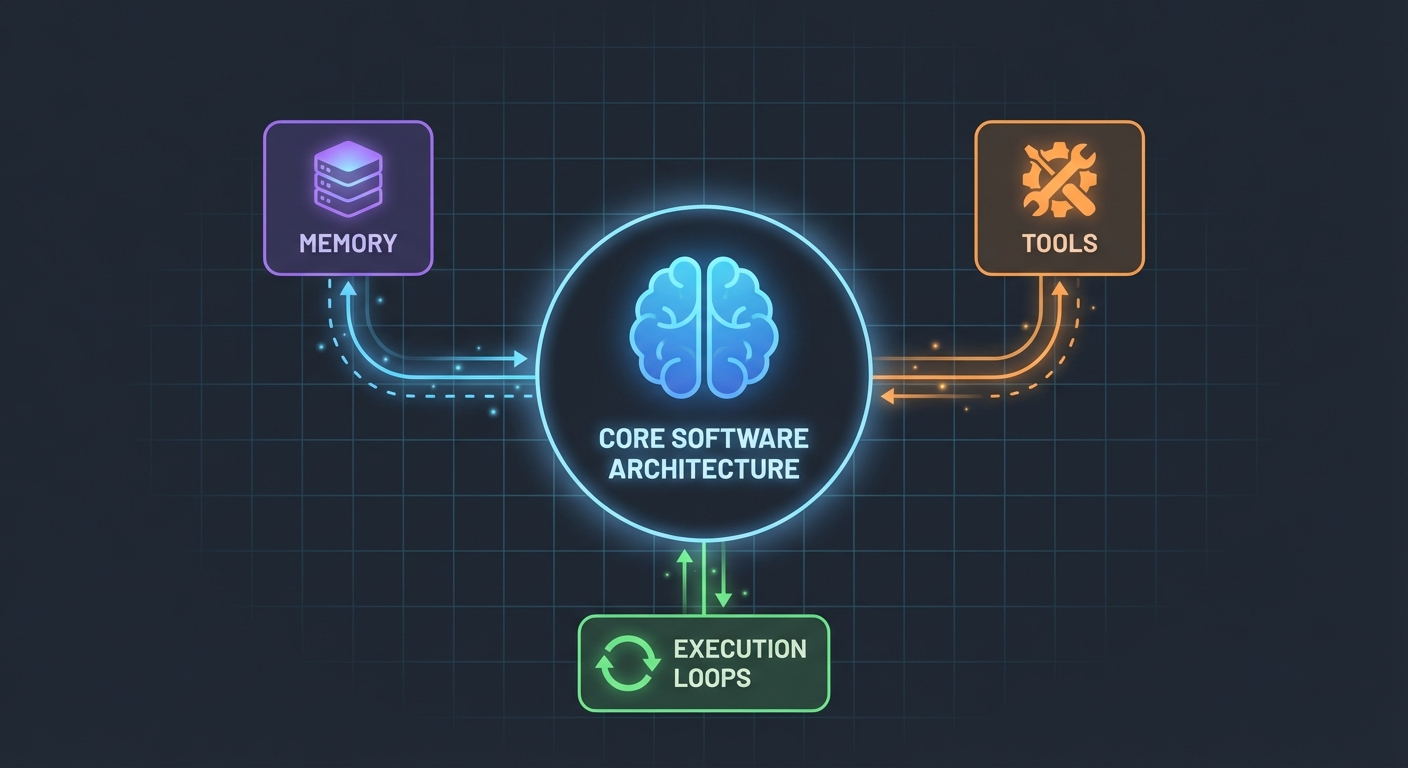
Here's what surprised me: AI agents aren't that complicated. At their core, they're just:
- An LLM that can call functions
- A set of tools the LLM can use
- A loop that executes those tools
- Memory to maintain context
That's it. The complexity comes from making these pieces work together reliably.
The Database Schema
First, the foundation. We need tables for users, posts, and messages:
export const User = pgTable("user", (t) => ({
  id: t.integer().primaryKey().generatedAlwaysAsIdentity(),
  name: t.varchar({ length: 255 }).notNull(),
  email: t.varchar({ length: 255 }).notNull().unique(),
  bio: t.text(),
  createdAt: t.timestamp().defaultNow().notNull(),
  updatedAt: t.timestamp().defaultNow().notNull(),
}));

export const Post = pgTable("post", (t) => ({
  id: t.integer().primaryKey().generatedAlwaysAsIdentity(),
  userId: t
    .integer()
    .notNull()
    .references(() => User.id, { onDelete: "cascade" }),
  title: t.varchar({ length: 500 }).notNull(),
  content: t.text().notNull(),
  published: t.boolean().default(false).notNull(),
  createdAt: t.timestamp().defaultNow().notNull(),
  updatedAt: t.timestamp().defaultNow().notNull(),
}));
Nothing fancy. Just clean, relational data with PostgreSQL. The Message table stores conversation history - crucial for maintaining context between requests.
Building the Tools (Where the Magic Happens)
This is where most tutorials get vague. "Just create some tools," they say. Let me show you what that actually looks like.
Tools are functions your AI can call. With LangChain's DynamicStructuredTool, you define:
- What the tool does (description)
- What inputs it needs (schema with Zod)
- What it actually executes (function)
Here's the tool for creating users:
const createUserTool = new DynamicStructuredTool({
  name: "create_user",
  description:
    "Create a new user in the database. Use this when asked to add, create, or register a user.",
  schema: z.object({
    name: z.string().describe("The user's full name"),
    email: z.string().email().describe("The user's email address"),
    bio: z.string().optional().describe("Optional biography"),
  }),
  func: async (input) => {
    const { name, email, bio } = input as {
      name: string;
      email: string;
      bio?: string;
    };
    const user = await caller.user.create({ name, email, bio });
    return `Successfully created user: ${user.name} (ID: ${user.id}, Email: ${user.email})`;
  },
});
The description matters more than you'd think. The LLM uses it to decide when to call this tool. Be specific about when to use it.
The return value? That's what the LLM sees. I return structured text with all the relevant details - IDs, names, confirmation. This helps the LLM give better responses to users.
The Agent: Putting It All Together
Here's where it gets interesting. The new LangChain API (v1.2+) simplified everything:
const agent = createAgent({
  model: new ChatGoogleGenerativeAI({
    apiKey: process.env.GOOGLE_GENERATIVE_AI_API_KEY,
    model: "gemini-2.0-flash-exp",
    temperature: 0.7,
  }),
  tools: [...createUserTools(caller), ...createPostTools(caller)],
  systemPrompt: AGENT_SYSTEM_PROMPT,
});

const result = await agent.invoke({
  messages: conversationMessages,
});
That's it. No ChatPromptTemplate, no AgentExecutor, no complex chains. Just createAgent and invoke.
The System Prompt (Your Agent's Personality)
This is where you teach your agent how to behave:
const AGENT_SYSTEM_PROMPT = `You are an AI assistant that helps manage a blog platform.

You have access to tools for:
- User management (create, read, list, count)
- Post management (create, list)

When users ask you to perform actions:
1. Use the appropriate tools to complete the task
2. Be conversational and friendly
3. Provide clear confirmation with specific details
4. When creating mock data, use realistic names and content

Always confirm successful operations with relevant details.`;
I learned this the hard way: be explicit. Tell the agent exactly what to do, how to respond, and what details to include. Vague prompts lead to vague behavior.
Handling Conversation History
Most examples skip this, but it's critical for a good user experience. Here's how I handle it:
// Get last 10 messages from database
const history = await ctx.db
  .select()
  .from(Message)
  .orderBy(desc(Message.createdAt))
  .limit(10);

// Convert to LangChain format
const conversationMessages = [
  ...history.reverse().map((msg) => ({
    role: msg.role === "user" ? "user" : "assistant",
    content: msg.content,
  })),
  { role: "user", content: input.message },
];
Simple, but effective. The agent now remembers the last 10 exchanges. Enough for context, not so much that it gets confused or expensive.
The Messy Parts (What Actually Broke)
Circular Dependencies: My first attempt failed because agent.ts imported appRouter, which imported agentRouter, creating a circular dependency. Solution? Create a temporary router inline with just the routers you need for tools.
Tool Response Extraction: LangChain's response format changed in v1.2. The result is now in result.messages[result.messages.length - 1].content, not result.output. This took me an hour to figure out.
Type Safety: The tool func parameter needs explicit typing. You can't just destructure - you need to cast input first. TypeScript won't help you here.
Setting Up Your Own
Here's what you actually need:
- Install dependencies:
pnpm add @langchain/core @langchain/google-genai langchain drizzle-orm
- Environment variables:
POSTGRES_URL="your-database-url"  # Try Vercel Postgres, Supabase, or local PostgreSQL
GOOGLE_GENERATIVE_AI_API_KEY="your-gemini-key"  # Get from https://aistudio.google.com/app/apikey
- Database setup:
pnpm db:push # Creates tables from schema
- Start building:
- Define your database schema
- Create tRPC procedures for CRUD operations
- Build LangChain tools that wrap those procedures
- Create the agent with your tools
- Wire it up to your frontend
What I'd Do Differently
If I started over tomorrow:
Start with fewer tools. I built 7 tools initially. Stick with 3-4 core ones first. Get those working perfectly, then expand.
Test tools independently. Don't wait until the agent is built to test your tools. Call them directly with test data first.
Monitor tool usage. I added logging to see which tools the agent calls and why. This revealed that my tool descriptions needed work.
Use streaming. Right now, users wait for the complete response. Streaming would make it feel faster, even if it takes the same time.
The Reality Check
Building AI agents isn't magic, but it's not trivial either. You'll spend more time on:
- Tool design (what should each tool do?)
- Prompt engineering (how do I make the agent behave correctly?)
- Error handling (what if the database is down? what if the LLM hallucinates?)
- Type safety (making TypeScript happy with dynamic LLM responses)
Than on the actual AI part.
Try It Yourself
The code for this tutorial is real - I built it while writing this. You can:
- Test it with: "create 3 mock users"
- Try: "create 2 blog posts for user 1"
- Ask: "how many users do we have?"
The agent handles all of these by deciding which tools to call, executing them, and responding conversationally.
What's Next
This is just the foundation. From here, you could:
- Add authentication (who can create what?)
- Implement streaming responses
- Add more complex tools (search, analytics, integrations)
- Build a feedback loop (did the tool call succeed?)
- Add rate limiting (don't let users create 10,000 posts)
But start simple. Get one tool working well before adding ten mediocre ones.
The best part? Once you understand this pattern - tools + LLM + memory - you can build agents for anything. Database management, customer support, content generation, whatever.
The hard part isn't the code. It's designing tools that actually solve real problems.
Resources:
- Full source code: github.com/giftedunicorn/my-ai-agent
- Built with Create T3 Turbo
- LangChain Docs: js.langchain.com
- Get Gemini API key: aistudio.google.com
Share this
Written by Feng Liu
shenjian8628@gmail.com