
So baust du 2026 eine moderne, KI-gestützte Web-App mit i18n
Der komplette Guide für mehrsprachige Web-Apps mit Lingui + AI-Übersetzungen. Unterstütze automatisch 17 Sprachen mit Next.js, Claude und T3 Turbo.


Hör zu, wir müssen über i18n im Jahr 2026 reden.
Die meisten Tutorials werden dir raten, Strings manuell zu übersetzen, Übersetzer einzustellen oder irgendeine wackelige Google Translate API zu nutzen. Aber hier ist der Punkt: Du lebst in der Ära von Claude Sonnet 4.5. Warum übersetzt du immer noch, als wäre es 2019?
Ich zeige dir, wie wir eine Produktiv-Webapp gebaut haben, die 17 Sprachen fließend spricht – mit einer zweiteiligen i18n-Architektur, die tatsächlich Sinn ergibt:
- Lingui für die Extraktion, Kompilierung und die Runtime-Magie
- Ein eigenes i18n-Package, angetrieben von LLMs für automatisierte, kontextbezogene Übersetzungen
Unser Stack? Create T3 Turbo mit Next.js, tRPC, Drizzle, Postgres, Tailwind und dem AI SDK. Wenn du das 2026 noch nicht nutzt, müssen wir uns mal ernsthaft unterhalten.
Lass uns bauen.
Das Problem mit traditionellem i18n
Traditionelle i18n-Workflows sehen so aus:
# Strings extrahieren
$ lingui extract

# ??? Irgendwie Übersetzungen bekommen ???
# (Übersetzer anheuern, dubiose Dienste nutzen, weinen)

# Kompilieren
$ lingui compile
Dieser mittlere Schritt? Ein absoluter Albtraum. Du hast die Wahl zwischen:
- $$$ für menschliche Übersetzer zahlen (langsam, teuer)
- Einfache Übersetzungs-APIs nutzen (kontextblind, klingt wie ein Roboter)
- Manuell übersetzen (skaliert nicht)
Wir machen das besser.
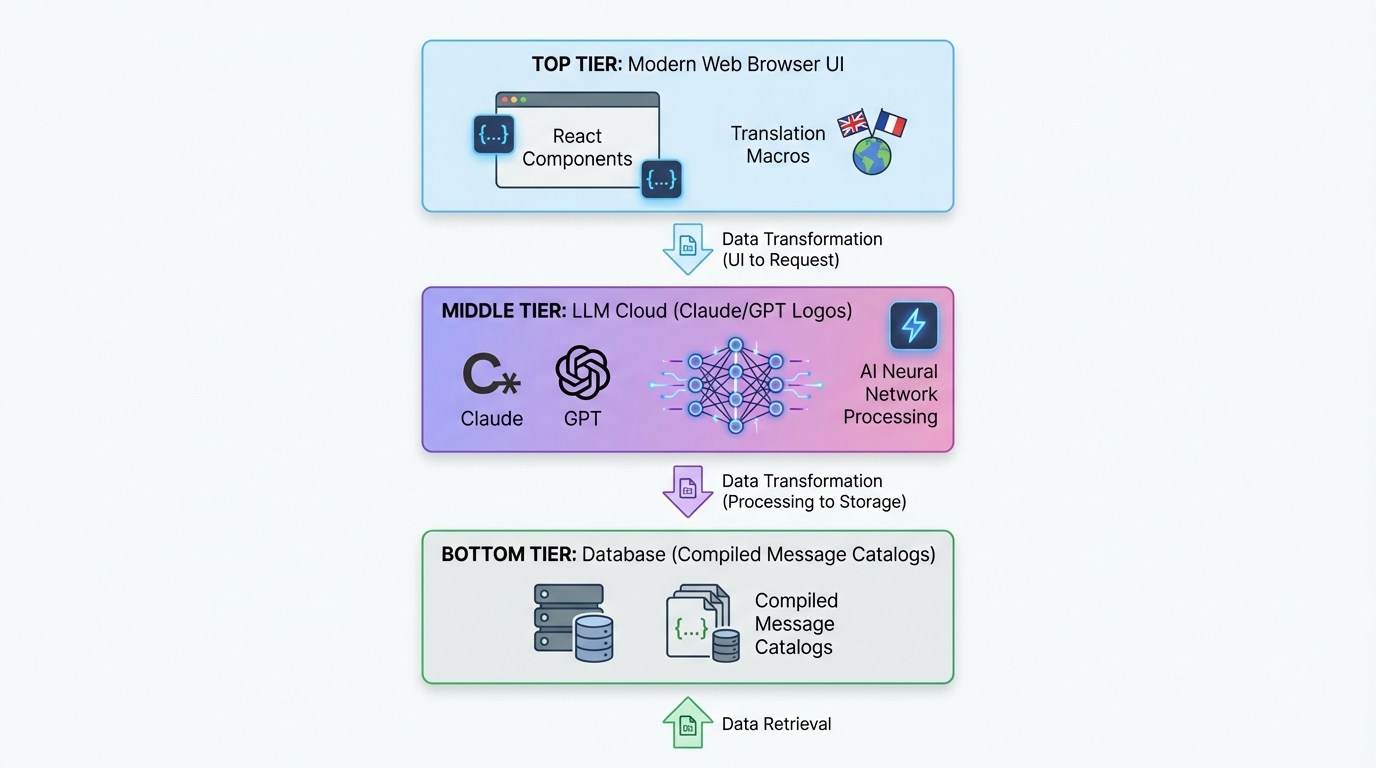
Die zweiteilige Architektur
Hier ist unser Setup:
┌─────────────────────────────────────────────┐
│  Next.js App (Lingui Integration)          │
│  ├─ Strings mit Makros extrahieren          │
│  ├─ Trans/t Komponenten in deinem Code      │
│  └─ Runtime i18n mit kompilierten Katalogen │
└─────────────────────────────────────────────┘
              ↓ generiert .po Dateien
┌─────────────────────────────────────────────┐
│  @acme/i18n Package (LLM Übersetzung)     │
│  ├─ Liest .po Dateien                       │
│  ├─ Batch-Übersetzung mit Claude/GPT-5      │
│  ├─ Kontextbewusst, produktspezifisch       │
│  └─ Schreibt übersetzte .po Dateien         │
└─────────────────────────────────────────────┘
              ↓ kompiliert zu TypeScript
┌─────────────────────────────────────────────┐
│  Kompilierte Message-Kataloge               │
│  └─ Schnelle, typsichere Runtime-Translat.  │
└─────────────────────────────────────────────┘
Teil 1 (Lingui) kümmert sich um die Developer Experience. Teil 2 (Custom i18n Package) übernimmt die Übersetzungsmagie.
Tauchen wir in beides ein.
Teil 1: Lingui in Next.js einrichten
Installation
In deinem T3 Turbo Monorepo:
# In apps/nextjs
pnpm add @lingui/core @lingui/react @lingui/macro
pnpm add -D @lingui/cli @lingui/swc-plugin
Lingui Konfiguration
Erstelle apps/nextjs/lingui.config.ts:
import type { LinguiConfig } from "@lingui/conf";

const config: LinguiConfig = {
  locales: [
    "en", "zh_CN", "zh_TW", "ja", "ko",
    "de", "fr", "es", "pt", "ar", "it",
    "ru", "tr", "th", "id", "vi", "hi"
  ],
  sourceLocale: "en",
  fallbackLocales: {
    default: "en"
  },
  catalogs: [
    {
      path: "<rootDir>/src/locales/{locale}/messages",
      include: ["src"],
    },
  ],
};

export default config;
17 Sprachen direkt "out of the box". Warum auch nicht?
Next.js Integration
Aktualisiere next.config.js, um Linguis SWC-Plugin zu nutzen:
const linguiConfig = require("./lingui.config");

module.exports = {
  experimental: {
    swcPlugins: [
      [
        "@lingui/swc-plugin",
        {
          // Das macht deine Builds schneller
        },
      ],
    ],
  },
  // ... Rest deiner Config
};
Server-Side Setup
Erstelle src/utils/i18n/appRouterI18n.ts:
import { setupI18n } from "@lingui/core";
import { allMessages } from "./initLingui";

const locales = ["en", "zh_CN", "zh_TW", /* ... */] as const;

const instances = new Map<string, ReturnType<typeof setupI18n>>();

// i18n-Instanzen für alle Locales vorerstellen
locales.forEach((locale) => {
  const i18n = setupI18n({
    locale,
    messages: { [locale]: allMessages[locale] },
  });
  instances.set(locale, i18n);
});

export function getI18nInstance(locale: string) {
  return instances.get(locale) ?? instances.get("en")!;
}
Warum? Server Components haben keinen React Context. Das hier gibt dir serverseitige Übersetzungen.
Client-Side Provider
Erstelle src/providers/LinguiClientProvider.tsx:
"use client";

import { I18nProvider } from "@lingui/react";
import { setupI18n } from "@lingui/core";
import { useEffect, useState } from "react";

export function LinguiClientProvider({
  children,
  locale,
  messages
}: {
  children: React.ReactNode;
  locale: string;
  messages: any;
}) {
  const [i18n] = useState(() =>
    setupI18n({
      locale,
      messages: { [locale]: messages },
    })
  );

  useEffect(() => {
    i18n.load(locale, messages);
    i18n.activate(locale);
  }, [locale, messages, i18n]);

  return <I18nProvider i18n={i18n}>{children}</I18nProvider>;
}
Wickle deine App in layout.tsx ein:
import { LinguiClientProvider } from "@/providers/LinguiClientProvider";
import { getLocale } from "@/utils/i18n/localeDetection";
import { allMessages } from "@/utils/i18n/initLingui";

export default function RootLayout({ children }: { children: React.ReactNode }) {
  const locale = getLocale();

  return (
    <html lang={locale}>
      <body>
        <LinguiClientProvider locale={locale} messages={allMessages[locale]}>
          {children}
        </LinguiClientProvider>
      </body>
    </html>
  );
}
Übersetzungen im Code verwenden
In Server Components:
import { msg } from "@lingui/core/macro";
import { getI18nInstance } from "@/utils/i18n/appRouterI18n";

export async function generateMetadata({ params }) {
  const locale = getLocale();
  const i18n = getI18nInstance(locale);

  return {
    title: i18n._(msg`Pricing Plans | acme`),
    description: i18n._(msg`Choose the perfect plan for you`),
  };
}
In Client Components:
"use client";

import { Trans, useLingui } from "@lingui/react/macro";

export function PricingCard() {
  const { t } = useLingui();

  return (
    <div>
      <h1><Trans>Pricing Plans</Trans></h1>
      <p>{t`Ultimate entertainment experience`}</p>

      {/* Mit Variablen */}
      <p>{t`${credits} credits remaining`}</p>
    </div>
  );
}
Die Makro-Syntax ist der SCHLÜSSEL. Lingui extrahiert diese zur Build-Zeit.
Teil 2: Das KI-gestützte Übersetzungs-Package
Jetzt wird es spannend.
Package Struktur
Erstelle packages/i18n/:
packages/i18n/
├── package.json
├── src/
│   ├── translateWithLLM.ts      # Kern-LLM-Übersetzung
│   ├── enhanceTranslations.ts   # Batch-Prozessor
│   └── utils.ts                  # Hilfsfunktionen
package.json
{
  "name": "@acme/i18n",
  "version": "0.1.0",
  "dependencies": {
    "@acme/ai": "workspace:*",
    "openai": "^4.77.3",
    "pofile": "^1.1.4",
    "zod": "^3.23.8"
  }
}
Die LLM Übersetzungs-Engine
Hier ist das Geheimrezept – translateWithLLM.ts:
import { openai } from "@ai-sdk/openai";
import { generateText } from "ai";
import { z } from "zod";

const translationSchema = z.object({
  translations: z.array(
    z.object({
      msgid: z.string(),
      msgstr: z.string(),
    })
  ),
});

export async function translateWithLLM(
  messages: Array<{ msgid: string; msgstr: string }>,
  targetLocale: string,
  options?: { model?: string }
) {
  const prompt = `You are a professional translator for acme, an AI-powered creative platform.

Translate the following strings from English to ${getLanguageName(targetLocale)}.

CONTEXT:
- acme is a platform for AI chat, image generation, and creative content
- Keep brand names unchanged (acme, Claude, etc.)
- Preserve HTML tags, variables like {count}, and placeholders
- Adapt culturally where appropriate
- Maintain tone: friendly, creative, engaging

STRINGS TO TRANSLATE:
${JSON.stringify(messages, null, 2)}

Return a JSON object with this structure:
{
  "translations": [
    { "msgid": "original", "msgstr": "translation" },
    ...
  ]
}`;

  const result = await generateText({
    model: openai(options?.model ?? "gpt-4o"),
    prompt,
    temperature: 0.3, // Niedriger = konsistenter
  });

  const parsed = translationSchema.parse(JSON.parse(result.text));
  return parsed.translations;
}

function getLanguageName(locale: string): string {
  const names: Record<string, string> = {
    zh_CN: "Simplified Chinese",
    zh_TW: "Traditional Chinese",
    ja: "Japanese",
    ko: "Korean",
    de: "German",
    fr: "French",
    es: "Spanish",
    pt: "Portuguese",
    ar: "Arabic",
    // ... usw.
  };
  return names[locale] ?? locale;
}
Warum das funktioniert:
- Kontextbewusst: Das LLM weiß, was "acme" ist.
- Strukturierter Output: Das Zod-Schema garantiert valides JSON.
- Niedrige Temperature: Konsistente Übersetzungen.
- Erhält Formatierung: HTML und Variablen bleiben intakt.
Batch Translation Processor
Erstelle enhanceTranslations.ts:
import fs from "fs";
import path from "path";
import pofile from "pofile";
import { translateWithLLM } from "./translateWithLLM";

const BATCH_SIZE = 30; // 30 Strings auf einmal übersetzen
const DELAY_MS = 1000; // Rate Limiting

export async function enhanceTranslations(
  locale: string,
  catalogPath: string
) {
  const poPath = path.join(catalogPath, locale, "messages.po");
  const po = pofile.parse(fs.readFileSync(poPath, "utf-8"));

  // Unübersetzte Items finden
  const untranslated = po.items.filter(
    (item) => item.msgid && (!item.msgstr || item.msgstr[0] === "")
  );

  if (untranslated.length === 0) {
    console.log(`✓ ${locale}: All strings translated`);
    return;
  }

  console.log(`Translating ${untranslated.length} strings for ${locale}...`);

  // In Batches verarbeiten
  for (let i = 0; i < untranslated.length; i += BATCH_SIZE) {
    const batch = untranslated.slice(i, i + BATCH_SIZE);
    const messages = batch.map((item) => ({
      msgid: item.msgid,
      msgstr: item.msgstr?.[0] ?? "",
    }));

    try {
      const translations = await translateWithLLM(messages, locale);

      // PO Datei aktualisieren
      translations.forEach((translation, index) => {
        const item = batch[index];
        if (item) {
          item.msgstr = [translation.msgstr];
        }
      });

      console.log(`  ${i + batch.length}/${untranslated.length} translated`);

      // Fortschritt speichern
      fs.writeFileSync(poPath, po.toString());

      // Rate Limiting
      if (i + BATCH_SIZE < untranslated.length) {
        await new Promise((resolve) => setTimeout(resolve, DELAY_MS));
      }
    } catch (error) {
      console.error(`  Error translating batch: ${error}`);
      // Mit nächstem Batch fortfahren
    }
  }

  console.log(`✓ ${locale}: Translation complete!`);
}
Batch-Verarbeitung verhindert Token-Limits und spart Kosten.
Das Übersetzungs-Skript
Erstelle apps/nextjs/script/i18n.ts:
import { enhanceTranslations } from "@acme/i18n";
import { exec } from "child_process";
import { promisify } from "util";

const execAsync = promisify(exec);

const LOCALES = [
  "zh_CN", "zh_TW", "ja", "ko", "de",
  "fr", "es", "pt", "ar", "it", "ru"
];

async function main() {
  // Schritt 1: Strings aus dem Code extrahieren
  console.log("📝 Extracting strings...");
  await execAsync("pnpm run lingui:extract --clean");

  // Schritt 2: Fehlende Strings automatisch übersetzen
  console.log("\n🤖 Translating with AI...");
  const catalogPath = "./src/locales";

  for (const locale of LOCALES) {
    await enhanceTranslations(locale, catalogPath);
  }

  // Schritt 3: Zu TypeScript kompilieren
  console.log("\n⚡ Compiling catalogs...");
  await execAsync("npx lingui compile --typescript");

  console.log("\n✅ Done! All translations updated.");
}

main().catch(console.error);
Füge dies zu package.json hinzu:
{
  "scripts": {
    "i18n": "tsx script/i18n.ts",
    "lingui:extract": "lingui extract",
    "lingui:compile": "lingui compile --typescript"
  }
}
Deine i18n-Pipeline ausführen
# Ein Befehl für alles
$ pnpm run i18n

📝 Extracting strings...
Catalog statistics for src/locales/{locale}/messages:
┌──────────┬─────────────┬─────────┐
│ Language │ Total count │ Missing │
├──────────┼─────────────┼─────────┤
│ en       │         847 │       0 │
│ zh_CN    │         847 │     123 │
│ ja       │         847 │      89 │
└──────────┴─────────────┴─────────┘

🤖 Translating with AI...
Translating 123 strings for zh_CN...
  30/123 translated
  60/123 translated
  90/123 translated
  123/123 translated
✓ zh_CN: Translation complete!

⚡ Compiling catalogs...
✅ Done! All translations updated.
Das war's. Füge einen neuen String in deinen Code ein, führe pnpm i18n aus, boom – übersetzt in 17 Sprachen.

Locale Switching
Vergiss nicht die UX-Seite. Hier ist ein Locale-Switcher:
"use client";

import { useLocaleSwitcher } from "@/hooks/useLocaleSwitcher";
import { useLocale } from "@/hooks/useLocale";

const LOCALES = {
  en: "English",
  zh_CN: "简体中文",
  zh_TW: "繁體中文",
  ja: "日本語",
  ko: "한국어",
  // ... usw.
};

export function LocaleSelector() {
  const currentLocale = useLocale();
  const { switchLocale } = useLocaleSwitcher();

  return (
    <select
      value={currentLocale}
      onChange={(e) => switchLocale(e.target.value)}
    >
      {Object.entries(LOCALES).map(([code, name]) => (
        <option key={code} value={code}>
          {name}
        </option>
      ))}
    </select>
  );
}
Die Hook-Implementierung:
// hooks/useLocaleSwitcher.tsx
"use client";

import { setUserLocale } from "@/utils/i18n/localeDetection";

export function useLocaleSwitcher() {
  const switchLocale = (locale: string) => {
    setUserLocale(locale);
    window.location.reload(); // Force reload um Locale anzuwenden
  };

  return { switchLocale };
}
Speichere die Präferenz in einem Cookie:
// utils/i18n/localeDetection.ts
import { cookies } from "next/headers";

export function setUserLocale(locale: string) {
  cookies().set("NEXT_LOCALE", locale, {
    maxAge: 365 * 24 * 60 * 60, // 1 Jahr
  });
}

export function getLocale(): string {
  const cookieStore = cookies();
  return cookieStore.get("NEXT_LOCALE")?.value ?? "en";
}
Fortgeschritten: Typsichere Übersetzungen
Willst du Typsicherheit? Lingui hat dich abgedeckt:
// Statt so:
t`Hello ${name}`

// Nutze msg descriptor:
import { msg } from "@lingui/core/macro";

const greeting = msg`Hello ${name}`;
const translated = i18n._(greeting);
Deine IDE wird die Translation-Keys autovervollständigen. Wunderschön.
Performance Überlegungen
1. Zur Build-Zeit kompilieren
Lingui kompiliert Übersetzungen zu minifiziertem JSON. Kein Parsing-Overhead zur Laufzeit.
// Kompilierter Output (minifiziert):
export const messages = JSON.parse('{"ICt8/V":["视频"],"..."}');
2. Server-Kataloge vorladen
Lade alle Kataloge einmal beim Start (siehe appRouterI18n.ts oben). Kein Datei-I/O bei jedem Request.
3. Client Bundle Size
Liefere nur das aktive Locale an den Client aus:
<LinguiClientProvider
  locale={locale}
  messages={allMessages[locale]} // Nur ein Locale
>
4. LLM Kostenoptimierung
- Batch-Übersetzungen: 30 Strings pro API-Call
- Übersetzungen cachen: Unveränderte Strings nicht neu übersetzen
- Günstigere Modelle nutzen: GPT-4o-mini für weniger kritische Sprachen
Unsere Kosten? ~$2-3 für 800+ Strings × 16 Sprachen. Pfennigbeträge im Vergleich zu menschlichen Übersetzern.
Die Integration in den Full Tech Stack
Schauen wir uns an, wie das mit dem Rest von T3 Turbo zusammenspielt:
tRPC mit i18n
// server/api/routers/user.ts
import { createTRPCRouter, publicProcedure } from "../trpc";
import { msg } from "@lingui/core/macro";

export const userRouter = createTRPCRouter({
  subscribe: publicProcedure
    .mutation(async ({ ctx }) => {
      // Fehler können auch übersetzt werden!
      if (!ctx.session?.user) {
        throw new TRPCError({
          code: "UNAUTHORIZED",
          message: ctx.i18n._(msg`You must be logged in`),
        });
      }

      // ... Subscription Logik
    }),
});
Reiche die i18n-Instanz via Context weiter:
// server/api/trpc.ts
import { getI18nInstance } from "@/utils/i18n/appRouterI18n";

export const createTRPCContext = async (opts: CreateNextContextOptions) => {
  const locale = getLocale();
  const i18n = getI18nInstance(locale);

  return {
    session: await getServerAuthSession(),
    i18n,
    locale,
  };
};
Datenbank mit Drizzle
Speichere die Locale-Präferenz des Users:
// packages/db/schema/user.ts
import { pgTable, text, varchar } from "drizzle-orm/pg-core";

export const users = pgTable("user", {
  id: varchar("id", { length: 255 }).primaryKey(),
  locale: varchar("locale", { length: 10 }).default("en"),
  // ... andere Felder
});
AI SDK Integration
Übersetze KI-Antworten on-the-fly:
import { openai } from "@ai-sdk/openai";
import { generateText } from "ai";
import { useLingui } from "@lingui/react/macro";

export function useAIChat() {
  const { i18n } = useLingui();

  const chat = async (prompt: string) => {
    const systemPrompt = i18n._(msg`You are a helpful AI assistant for acme.`);

    return generateText({
      model: openai("gpt-4"),
      messages: [
        { role: "system", content: systemPrompt },
        { role: "user", content: prompt },
      ],
    });
  };

  return { chat };
}
Best Practices, die wir gelernt haben
1. Immer Makros verwenden
// ❌ Schlecht: Runtime-Übersetzung (wird nicht extrahiert)
const text = t("Hello world");

// ✅ Gut: Makro (wird zur Build-Zeit extrahiert)
const text = t`Hello world`;
2. Kontext ist alles
Füge Kommentare für Übersetzer hinzu:
// i18n: This appears in the pricing table header
<Trans>Monthly</Trans>

// i18n: Button to submit payment form
<button>{t`Subscribe Now`}</button>
Lingui extrahiert diese als Notizen für Übersetzer (bzw. das LLM).
3. Pluralformen richtig behandeln
import { Plural } from "@lingui/react/macro";

<Plural
  value={count}
  one="# credit remaining"
  other="# credits remaining"
/>
Verschiedene Sprachen haben verschiedene Pluralregeln. Lingui regelt das.
4. Datums-/Zahlenformatierung
Nutze Intl APIs:
const date = new Intl.DateTimeFormat(locale, {
  dateStyle: "long",
}).format(new Date());

const price = new Intl.NumberFormat(locale, {
  style: "currency",
  currency: "USD",
}).format(29.99);
5. RTL Support
Für Arabisch musst du die Richtung beachten:
export default function RootLayout({ children }) {
  const locale = getLocale();
  const direction = locale === "ar" ? "rtl" : "ltr";

  return (
    <html lang={locale} dir={direction}>
      <body>{children}</body>
    </html>
  );
}
Zur Tailwind Config hinzufügen:
module.exports = {
  plugins: [
    require('tailwindcss-rtl'),
  ],
};
Nutze richtungsabhängige Klassen:
<div className="ms-4"> {/* margin-start, funktioniert für LTR & RTL */}
Deployment Checklist
Bevor du shippst:
- Führe
pnpm i18naus, um sicherzustellen, dass alle Übersetzungen aktuell sind - Teste jedes Locale im Production-Mode
- Überprüfe, ob das Locale-Cookie bestehen bleibt
- Checke das RTL-Layout für Arabisch
- Teste die UX des Locale-Switchers
- Füge hreflang-Tags für SEO hinzu
- Richte bei Bedarf Routing basierend auf Locales ein
- Überwache die LLM-Übersetzungskosten
Die Ergebnisse
Nach der Implementierung dieses Systems:
- 17 Sprachen unterstützt out of the box
- ~850 Strings automatisch übersetzt
- $2-3 Gesamtkosten für die komplette Übersetzung
- 2-Minuten Update-Zyklus beim Hinzufügen neuer Strings
- Null manuelle Übersetzungsarbeit
- Kontextbewusste, hochwertige Übersetzungen
Vergleich das mal mit:
- Menschlichen Übersetzern: $0.10-0.30 pro Wort = $1.000+
- Traditionellen Agenturen: Immer noch teuer, immer noch langsam
- Manueller Arbeit: Skaliert nicht
Warum das 2026 wichtig ist
Hör zu, das Web ist global. Wenn du 2026 nur Englisch auslieferst, lässt du 90% der Welt außen vor.
Aber traditionelles i18n ist schmerzhaft. Dieser Ansatz macht es trivial:
- Code mit Trans/t Makros schreiben (dauert 2 Sekunden)
pnpm i18nausführen (automatisiert)- An die Welt shippen (Profit)
Die Kombination aus Linguis Developer Experience + LLM-gestützten Übersetzungen ist ein echter Gamechanger. Du bekommst:
- Typsichere Übersetzungen
- Null Runtime-Overhead
- Automatische Extraktion
- Kontextbewusste KI-Übersetzungen
- Pfennigbeträge pro Sprache
- Unendliche Skalierbarkeit
Weiterführende Ideen
Willst du noch einen draufsetzen? Versuch das:
Dynamische Content-Übersetzung
Speichere Übersetzungen in deiner Datenbank:
// packages/db/schema/content.ts
export const blogPosts = pgTable("blog_post", {
  id: varchar("id", { length: 255 }).primaryKey(),
  titleEn: text("title_en"),
  titleZhCn: text("title_zh_cn"),
  titleJa: text("title_ja"),
  // ... usw.
});
Auto-Übersetzung beim Speichern:
import { translateWithLLM } from "@acme/i18n";

export const blogRouter = createTRPCRouter({
  create: protectedProcedure
    .input(z.object({ title: z.string() }))
    .mutation(async ({ input }) => {
      // In alle Sprachen übersetzen
      const translations = await Promise.all(
        LOCALES.map(async (locale) => {
          const result = await translateWithLLM(
            [{ msgid: input.title, msgstr: "" }],
            locale
          );
          return [locale, result[0].msgstr];
        })
      );

      await db.insert(blogPosts).values({
        id: generateId(),
        titleEn: input.title,
        ...Object.fromEntries(translations),
      });
    }),
});
User-Provided Translations
Lass Nutzer bessere Übersetzungen vorschlagen:
export const i18nRouter = createTRPCRouter({
  suggestTranslation: publicProcedure
    .input(z.object({
      msgid: z.string(),
      locale: z.string(),
      suggestion: z.string(),
    }))
    .mutation(async ({ input }) => {
      await db.insert(translationSuggestions).values(input);

      // Maintainer benachrichtigen
      await sendEmail({
        to: "i18n@acme.com",
        subject: `New translation suggestion for ${input.locale}`,
        body: `"${input.msgid}" → "${input.suggestion}"`,
      });
    }),
});
A/B Testing für Übersetzungen
Teste, welche Übersetzungen besser konvertieren:
const variant = await abTest.getVariant("pricing-cta", locale);

const ctaText = variant === "A"
  ? t`Start Your Free Trial`
  : t`Try acme Free`;
Der Code
All das ist Production-Code aus einer echten App. Die volle Implementierung liegt in unserem Monorepo:
t3-acme-app/
├── apps/nextjs/
│   ├── lingui.config.ts
│   ├── src/
│   │   ├── locales/           # Kompilierte Kataloge
│   │   ├── utils/i18n/        # i18n Utilities
│   │   └── providers/         # LinguiClientProvider
│   └── script/i18n.ts         # Übersetzungs-Skript
└── packages/i18n/
    └── src/
        ├── translateWithLLM.ts
        ├── enhanceTranslations.ts
        └── utils.ts
Abschließende Gedanken
Eine mehrsprachige AI-App im Jahr 2026 zu bauen ist nicht mehr schwer. Die Tools sind da:
- Lingui für Extraktion und Runtime
- Claude/GPT für kontextbewusste Übersetzung
- T3 Turbo für die beste DX im Spiel
Hör auf, Tausende für Übersetzungen zu zahlen. Hör auf, deine App auf Englisch zu beschränken.
Baue global. Shippe schnell. Nutze KI.
So machen wir das 2026.
Fragen? Probleme? Find mich auf Twitter oder check die Lingui Docs und AI SDK Docs.
Und jetzt geh und shippe diese mehrsprachige App. Die Welt wartet.
Teilen
Geschrieben von Feng Liu
shenjian8628@gmail.com