
2026 में i18n AI-Powered Modern Webapp कैसे बनाएं
Lingui + AI ट्रांसलेशन के साथ मल्टीलिंगुअल वेब ऐप्स बनाने की पूरी गाइड। Next.js, Claude और T3 Turbo का उपयोग करके 17 भाषाओं को ऑटोमैटिकली सपोर्ट करें।

Dekhiye, humein 2026 mein i18n ke baare mein baat karni hi padegi.
Zyadatar tutorials aapko strings ko manually translate karne, translators hire karne, ya koi toota-phoota Google Translate API use karne ke liye kahenge. Lekin baat yeh hai: aap Claude Sonnet 4.5 ke era mein jee rahe hain. Aap abhi bhi 2019 ki tarah translation kyun kar rahe hain?
Main aapko dikhane wala hoon ki humne ek production webapp kaise banaya jo 17 languages fluently bolta hai, ek two-piece i18n architecture ka use karke jo waqayi mein sense banata hai:
- Lingui extraction, compilation, aur runtime magic ke liye
- Ek custom i18n package jo automated, context-aware translations ke liye LLMs dwara powered hai
Humara stack? Create T3 Turbo jisme Next.js, tRPC, Drizzle, Postgres, Tailwind, aur AI SDK shamil hain. Agar aap 2026 mein iska use nahi kar rahe hain, toh humein alag se baat karni hogi.
Chaliye banate hain.
Traditional i18n ke Saath Problem
Traditional i18n workflows kuch aise dikhte hain:
# Extract strings
$ lingui extract

# ??? Kisi tarah translations laayein ???
# (translators hire karein, sketchy services use karein, royein)

# Compile
$ lingui compile
Woh beech wala step? Woh ek bura sapna (nightmare) hai. Aap ya toh:
- Human translators ke liye $$$ de rahe hain (slow, mehenga)
- Basic translation APIs use kar rahe hain (context-blind, robotic lagta hai)
- Manually translate kar rahe hain (scale nahi karta)
Hum isse behtar kar rahe hain.
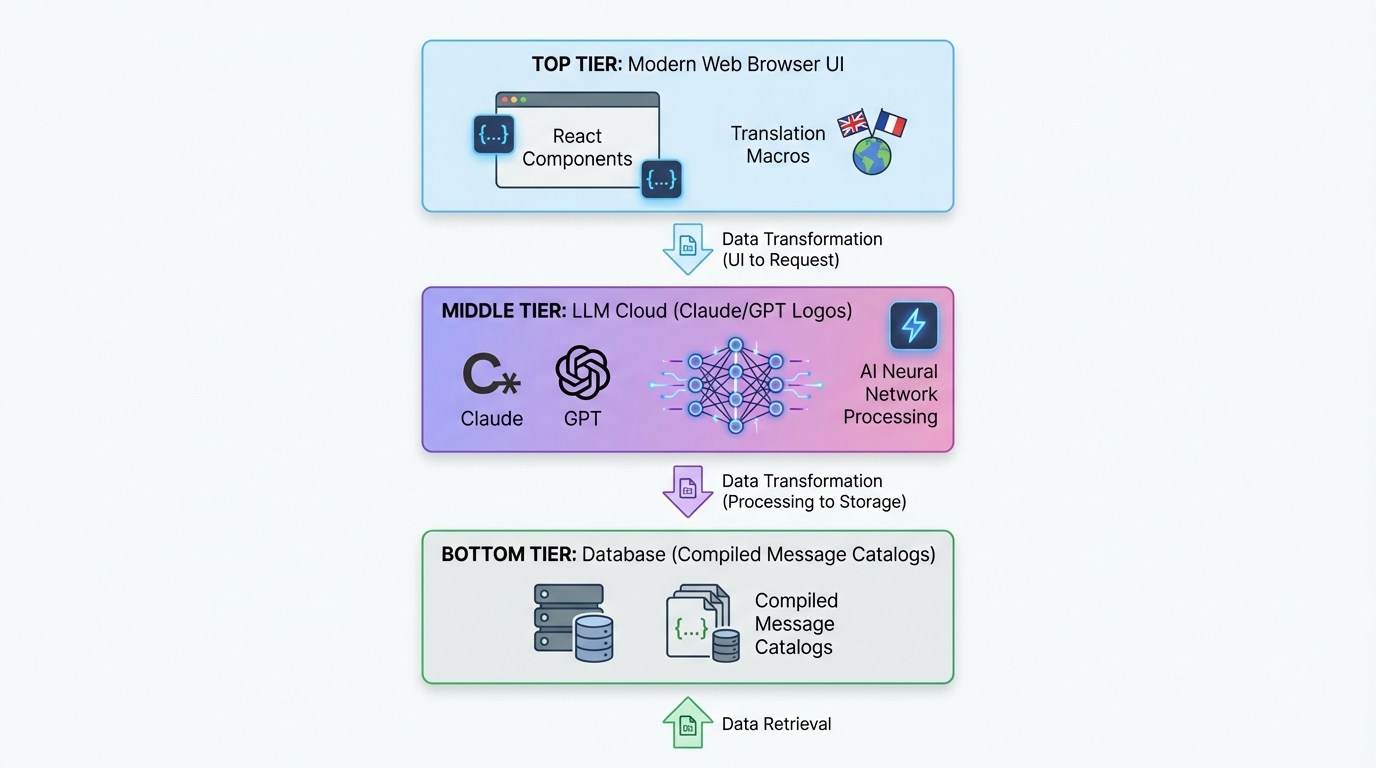
Two-Piece Architecture
Yeh raha humara setup:
┌─────────────────────────────────────────────┐
│  Next.js App (Lingui Integration)          │
│  ├─ Extract strings with macros             │
│  ├─ Trans/t components in your code         │
│  └─ Runtime i18n with compiled catalogs     │
└─────────────────────────────────────────────┘
              ↓ generates .po files
┌─────────────────────────────────────────────┐
│  @acme/i18n Package (LLM Translation)     │
│  ├─ Reads .po files                         │
│  ├─ Batch translates with Claude/GPT-5      │
│  ├─ Context-aware, product-specific         │
│  └─ Writes translated .po files             │
└─────────────────────────────────────────────┘
              ↓ compiles to TypeScript
┌─────────────────────────────────────────────┐
│  Compiled Message Catalogs                  │
│  └─ Fast, type-safe runtime translations    │
└─────────────────────────────────────────────┘
Piece 1 (Lingui) developer experience ko sambhalta hai. Piece 2 (Custom i18n Package) translation magic ko sambhalta hai.
Chaliye har ek mein gehraayi se utarte hain.
Part 1: Next.js mein Lingui Setup Karna
Installation
Apne T3 Turbo monorepo mein:
# In apps/nextjs
pnpm add @lingui/core @lingui/react @lingui/macro
pnpm add -D @lingui/cli @lingui/swc-plugin
Lingui Config
apps/nextjs/lingui.config.ts banayein:
import type { LinguiConfig } from "@lingui/conf";

const config: LinguiConfig = {
  locales: [
    "en", "zh_CN", "zh_TW", "ja", "ko",
    "de", "fr", "es", "pt", "ar", "it",
    "ru", "tr", "th", "id", "vi", "hi"
  ],
  sourceLocale: "en",
  fallbackLocales: {
    default: "en"
  },
  catalogs: [
    {
      path: "<rootDir>/src/locales/{locale}/messages",
      include: ["src"],
    },
  ],
};

export default config;
Seedhe box se bahar 17 languages. Kyunki kyun nahi?
Next.js Integration
Lingui ke SWC plugin ko use karne ke liye next.config.js update karein:
const linguiConfig = require("./lingui.config");

module.exports = {
  experimental: {
    swcPlugins: [
      [
        "@lingui/swc-plugin",
        {
          // This makes your builds faster
        },
      ],
    ],
  },
  // ... rest of your config
};
Server-Side Setup
src/utils/i18n/appRouterI18n.ts banayein:
import { setupI18n } from "@lingui/core";
import { allMessages } from "./initLingui";

const locales = ["en", "zh_CN", "zh_TW", /* ... */] as const;

const instances = new Map<string, ReturnType<typeof setupI18n>>();

// Pre-create i18n instances for all locales
locales.forEach((locale) => {
  const i18n = setupI18n({
    locale,
    messages: { [locale]: allMessages[locale] },
  });
  instances.set(locale, i18n);
});

export function getI18nInstance(locale: string) {
  return instances.get(locale) ?? instances.get("en")!;
}
Kyun? Server Components mein React Context nahi hota. Yeh aapko server-side translations deta hai.
Client-Side Provider
src/providers/LinguiClientProvider.tsx banayein:
"use client";

import { I18nProvider } from "@lingui/react";
import { setupI18n } from "@lingui/core";
import { useEffect, useState } from "react";

export function LinguiClientProvider({
  children,
  locale,
  messages
}: {
  children: React.ReactNode;
  locale: string;
  messages: any;
}) {
  const [i18n] = useState(() =>
    setupI18n({
      locale,
      messages: { [locale]: messages },
    })
  );

  useEffect(() => {
    i18n.load(locale, messages);
    i18n.activate(locale);
  }, [locale, messages, i18n]);

  return <I18nProvider i18n={i18n}>{children}</I18nProvider>;
}
Apne app ko layout.tsx mein wrap karein:
import { LinguiClientProvider } from "@/providers/LinguiClientProvider";
import { getLocale } from "@/utils/i18n/localeDetection";
import { allMessages } from "@/utils/i18n/initLingui";

export default function RootLayout({ children }: { children: React.ReactNode }) {
  const locale = getLocale();

  return (
    <html lang={locale}>
      <body>
        <LinguiClientProvider locale={locale} messages={allMessages[locale]}>
          {children}
        </LinguiClientProvider>
      </body>
    </html>
  );
}
Apne Code mein Translations ka Use Karna
Server Components mein:
import { msg } from "@lingui/core/macro";
import { getI18nInstance } from "@/utils/i18n/appRouterI18n";

export async function generateMetadata({ params }) {
  const locale = getLocale();
  const i18n = getI18nInstance(locale);

  return {
    title: i18n._(msg`Pricing Plans | acme`),
    description: i18n._(msg`Choose the perfect plan for you`),
  };
}
Client Components mein:
"use client";

import { Trans, useLingui } from "@lingui/react/macro";

export function PricingCard() {
  const { t } = useLingui();

  return (
    <div>
      <h1><Trans>Pricing Plans</Trans></h1>
      <p>{t`Ultimate entertainment experience`}</p>

      {/* With variables */}
      <p>{t`${credits} credits remaining`}</p>
    </div>
  );
}
Macro syntax sabse ZAROORI hai. Lingui inhe build time par extract karta hai.
Part 2: AI-Powered Translation Package
Yahan cheezein thodi spicy (mazedaar) ho jaati hain.
Package Structure
packages/i18n/ banayein:
packages/i18n/
├── package.json
├── src/
│   ├── translateWithLLM.ts      # Core LLM translation
│   ├── enhanceTranslations.ts   # Batch processor
│   └── utils.ts                  # Helpers
package.json
{
  "name": "@acme/i18n",
  "version": "0.1.0",
  "dependencies": {
    "@acme/ai": "workspace:*",
    "openai": "^4.77.3",
    "pofile": "^1.1.4",
    "zod": "^3.23.8"
  }
}
The LLM Translation Engine
Yeh raha secret sauce - translateWithLLM.ts:
import { openai } from "@ai-sdk/openai";
import { generateText } from "ai";
import { z } from "zod";

const translationSchema = z.object({
  translations: z.array(
    z.object({
      msgid: z.string(),
      msgstr: z.string(),
    })
  ),
});

export async function translateWithLLM(
  messages: Array<{ msgid: string; msgstr: string }>,
  targetLocale: string,
  options?: { model?: string }
) {
  const prompt = `You are a professional translator for acme, an AI-powered creative platform.

Translate the following strings from English to ${getLanguageName(targetLocale)}.

CONTEXT:
- acme is a platform for AI chat, image generation, and creative content
- Keep brand names unchanged (acme, Claude, etc.)
- Preserve HTML tags, variables like {count}, and placeholders
- Adapt culturally where appropriate
- Maintain tone: friendly, creative, engaging

STRINGS TO TRANSLATE:
${JSON.stringify(messages, null, 2)}

Return a JSON object with this structure:
{
  "translations": [
    { "msgid": "original", "msgstr": "translation" },
    ...
  ]
}`;

  const result = await generateText({
    model: openai(options?.model ?? "gpt-4o"),
    prompt,
    temperature: 0.3, // Lower = more consistent
  });

  const parsed = translationSchema.parse(JSON.parse(result.text));
  return parsed.translations;
}

function getLanguageName(locale: string): string {
  const names: Record<string, string> = {
    zh_CN: "Simplified Chinese",
    zh_TW: "Traditional Chinese",
    ja: "Japanese",
    ko: "Korean",
    de: "German",
    fr: "French",
    es: "Spanish",
    pt: "Portuguese",
    ar: "Arabic",
    // ... etc
  };
  return names[locale] ?? locale;
}
Yeh kyun kaam karta hai:
- Context-aware: LLM ko pata hai ki acme kya hai
- Structured output: Zod schema valid JSON ensure karta hai
- Low temperature: Consistent translations
- Preserves formatting: HTML, variables waise ke waise rehte hain
Batch Translation Processor
enhanceTranslations.ts banayein:
import fs from "fs";
import path from "path";
import pofile from "pofile";
import { translateWithLLM } from "./translateWithLLM";

const BATCH_SIZE = 30; // Translate 30 strings at a time
const DELAY_MS = 1000; // Rate limiting

export async function enhanceTranslations(
  locale: string,
  catalogPath: string
) {
  const poPath = path.join(catalogPath, locale, "messages.po");
  const po = pofile.parse(fs.readFileSync(poPath, "utf-8"));

  // Find untranslated items
  const untranslated = po.items.filter(
    (item) => item.msgid && (!item.msgstr || item.msgstr[0] === "")
  );

  if (untranslated.length === 0) {
    console.log(`✓ ${locale}: All strings translated`);
    return;
  }

  console.log(`Translating ${untranslated.length} strings for ${locale}...`);

  // Process in batches
  for (let i = 0; i < untranslated.length; i += BATCH_SIZE) {
    const batch = untranslated.slice(i, i + BATCH_SIZE);
    const messages = batch.map((item) => ({
      msgid: item.msgid,
      msgstr: item.msgstr?.[0] ?? "",
    }));

    try {
      const translations = await translateWithLLM(messages, locale);

      // Update PO file
      translations.forEach((translation, index) => {
        const item = batch[index];
        if (item) {
          item.msgstr = [translation.msgstr];
        }
      });

      console.log(`  ${i + batch.length}/${untranslated.length} translated`);

      // Save progress
      fs.writeFileSync(poPath, po.toString());

      // Rate limiting
      if (i + BATCH_SIZE < untranslated.length) {
        await new Promise((resolve) => setTimeout(resolve, DELAY_MS));
      }
    } catch (error) {
      console.error(`  Error translating batch: ${error}`);
      // Continue with next batch
    }
  }

  console.log(`✓ ${locale}: Translation complete!`);
}
Batch processing token limits ko rokta hai aur costs bachata hai.
The Translation Script
apps/nextjs/script/i18n.ts banayein:
import { enhanceTranslations } from "@acme/i18n";
import { exec } from "child_process";
import { promisify } from "util";

const execAsync = promisify(exec);

const LOCALES = [
  "zh_CN", "zh_TW", "ja", "ko", "de",
  "fr", "es", "pt", "ar", "it", "ru"
];

async function main() {
  // Step 1: Extract strings from code
  console.log("📝 Extracting strings...");
  await execAsync("pnpm run lingui:extract --clean");

  // Step 2: Auto-translate missing strings
  console.log("\n🤖 Translating with AI...");
  const catalogPath = "./src/locales";

  for (const locale of LOCALES) {
    await enhanceTranslations(locale, catalogPath);
  }

  // Step 3: Compile to TypeScript
  console.log("\n⚡ Compiling catalogs...");
  await execAsync("npx lingui compile --typescript");

  console.log("\n✅ Done! All translations updated.");
}

main().catch(console.error);
package.json mein add karein:
{
  "scripts": {
    "i18n": "tsx script/i18n.ts",
    "lingui:extract": "lingui extract",
    "lingui:compile": "lingui compile --typescript"
  }
}
Apni i18n Pipeline Run Karna
# One command to rule them all
$ pnpm run i18n

📝 Extracting strings...
Catalog statistics for src/locales/{locale}/messages:
┌──────────┬─────────────┬─────────┐
│ Language │ Total count │ Missing │
├──────────┼─────────────┼─────────┤
│ en       │         847 │       0 │
│ zh_CN    │         847 │     123 │
│ ja       │         847 │      89 │
└──────────┴─────────────┴─────────┘

🤖 Translating with AI...
Translating 123 strings for zh_CN...
  30/123 translated
  60/123 translated
  90/123 translated
  123/123 translated
✓ zh_CN: Translation complete!

⚡ Compiling catalogs...
✅ Done! All translations updated.
Bas itna hi. Apne code mein ek nayi string add karein, pnpm i18n run karein, boom - 17 languages mein translate ho gaya.

Locale Switching
UX wale hisse ko mat bhoolna. Yeh raha ek locale switcher:
"use client";

import { useLocaleSwitcher } from "@/hooks/useLocaleSwitcher";
import { useLocale } from "@/hooks/useLocale";

const LOCALES = {
  en: "English",
  zh_CN: "简体中文",
  zh_TW: "繁體中文",
  ja: "日本語",
  ko: "한국어",
  // ... etc
};

export function LocaleSelector() {
  const currentLocale = useLocale();
  const { switchLocale } = useLocaleSwitcher();

  return (
    <select
      value={currentLocale}
      onChange={(e) => switchLocale(e.target.value)}
    >
      {Object.entries(LOCALES).map(([code, name]) => (
        <option key={code} value={code}>
          {name}
        </option>
      ))}
    </select>
  );
}
Hook implementation:
// hooks/useLocaleSwitcher.tsx
"use client";

import { setUserLocale } from "@/utils/i18n/localeDetection";

export function useLocaleSwitcher() {
  const switchLocale = (locale: string) => {
    setUserLocale(locale);
    window.location.reload(); // Force reload to apply locale
  };

  return { switchLocale };
}
Preference ko cookie mein store karein:
// utils/i18n/localeDetection.ts
import { cookies } from "next/headers";

export function setUserLocale(locale: string) {
  cookies().set("NEXT_LOCALE", locale, {
    maxAge: 365 * 24 * 60 * 60, // 1 year
  });
}

export function getLocale(): string {
  const cookieStore = cookies();
  return cookieStore.get("NEXT_LOCALE")?.value ?? "en";
}
Advanced: Type-Safe Translations
Type safety chahiye? Lingui ne aapko cover kiya hai:
// Instead of this:
t`Hello ${name}`

// Use msg descriptor:
import { msg } from "@lingui/core/macro";

const greeting = msg`Hello ${name}`;
const translated = i18n._(greeting);
Aapka IDE translation keys ko autocomplete karega. Beautiful.
Performance Considerations
1. Build Time par Compile karein
Lingui translations ko minified JSON mein compile karta hai. Koi runtime parsing overhead nahi.
// Compiled output (minified):
export const messages = JSON.parse('{"ICt8/V":["视频"],"..."}');
2. Server Catalogs ko Pre-load karein
Startup par sabhi catalogs ek baar load karein (upar appRouterI18n.ts dekhein). Har request par koi file I/O nahi.
3. Client Bundle Size
Client ko sirf active locale ship karein:
<LinguiClientProvider
  locale={locale}
  messages={allMessages[locale]} // Only one locale
>
4. LLM Cost Optimization
- Batch translations: Har API call mein 30 strings
- Cache translations: Unchanged strings ko re-translate na karein
- Cheaper models use karein: Non-critical languages ke liye GPT-4o-mini
Humari cost? 800+ strings × 16 languages ke liye ~$2-3. Human translators ke mukable kuch bhi nahi (kaudiyon ke bhaav).
Full Tech Stack Integration
Dekhte hain yeh baaki T3 Turbo ke saath kaise khelta hai:
tRPC with i18n
// server/api/routers/user.ts
import { createTRPCRouter, publicProcedure } from "../trpc";
import { msg } from "@lingui/core/macro";

export const userRouter = createTRPCRouter({
  subscribe: publicProcedure
    .mutation(async ({ ctx }) => {
      // Errors can be translated too!
      if (!ctx.session?.user) {
        throw new TRPCError({
          code: "UNAUTHORIZED",
          message: ctx.i18n._(msg`You must be logged in`),
        });
      }

      // ... subscription logic
    }),
});
Context ke zariye i18n instance pass karein:
// server/api/trpc.ts
import { getI18nInstance } from "@/utils/i18n/appRouterI18n";

export const createTRPCContext = async (opts: CreateNextContextOptions) => {
  const locale = getLocale();
  const i18n = getI18nInstance(locale);

  return {
    session: await getServerAuthSession(),
    i18n,
    locale,
  };
};
Database with Drizzle
User locale preference store karein:
// packages/db/schema/user.ts
import { pgTable, text, varchar } from "drizzle-orm/pg-core";

export const users = pgTable("user", {
  id: varchar("id", { length: 255 }).primaryKey(),
  locale: varchar("locale", { length: 10 }).default("en"),
  // ... other fields
});
AI SDK Integration
AI responses ko on the fly translate karein:
import { openai } from "@ai-sdk/openai";
import { generateText } from "ai";
import { useLingui } from "@lingui/react/macro";

export function useAIChat() {
  const { i18n } = useLingui();

  const chat = async (prompt: string) => {
    const systemPrompt = i18n._(msg`You are a helpful AI assistant for acme.`);

    return generateText({
      model: openai("gpt-4"),
      messages: [
        { role: "system", content: systemPrompt },
        { role: "user", content: prompt },
      ],
    });
  };

  return { chat };
}
Best Practices Jo Humne Seekhi
1. Hamesha Macros Use Karein
// ❌ Bad: Runtime translation (not extracted)
const text = t("Hello world");

// ✅ Good: Macro (extracted at build time)
const text = t`Hello world`;
2. Context hi Sab Kuch Hai
Translators ke liye comments add karein:
// i18n: This appears in the pricing table header
<Trans>Monthly</Trans>

// i18n: Button to submit payment form
<button>{t`Subscribe Now`}</button>
Lingui inhe translator notes ke roop mein extract karta hai.
3. Plurals ko Theek se Handle Karein
import { Plural } from "@lingui/react/macro";

<Plural
  value={count}
  one="# credit remaining"
  other="# credits remaining"
/>
Alag-alag languages mein alag plural rules hote hain. Lingui ise handle karta hai.
4. Date/Number Formatting
Intl APIs use karein:
const date = new Intl.DateTimeFormat(locale, {
  dateStyle: "long",
}).format(new Date());

const price = new Intl.NumberFormat(locale, {
  style: "currency",
  currency: "USD",
}).format(29.99);
5. RTL Support
Arabic ke liye, direction handle karein:
export default function RootLayout({ children }) {
  const locale = getLocale();
  const direction = locale === "ar" ? "rtl" : "ltr";

  return (
    <html lang={locale} dir={direction}>
      <body>{children}</body>
    </html>
  );
}
Tailwind config mein add karein:
module.exports = {
  plugins: [
    require('tailwindcss-rtl'),
  ],
};
Directional classes use karein:
<div className="ms-4"> {/* margin-start, works for both LTR/RTL */}
Deployment Checklist
Ship karne se pehle:
-
pnpm i18nrun karein taaki ensure ho sake saari translations up to date hain - Production mode mein har locale test karein
- Locale cookie persistence verify karein
- Arabic ke liye RTL layout check karein
- Locale switcher UX test karein
- SEO ke liye hreflang tags add karein
- Agar zaroorat ho toh locale-based routing set up karein
- LLM translation costs monitor karein
Natije (The Results)
Is system ko implement karne ke baad:
- 17 languages supported seedhe box se bahar
- ~850 strings automatically translate hui
- $2-3 total cost full translation ke liye
- 2-minute update cycle jab nayi strings add ki
- Zero manual translation work
- Context-aware, high-quality translations
Iska mukabla isse karein:
- Human translators: $0.10-0.30 per word = $1,000+
- Traditional services: Abhi bhi mehengi, abhi bhi slow
- Manual work: Scale nahi karta
2026 mein Yeh Kyun Maayne Rakhta Hai
Dekho, web global hai. Agar aap 2026 mein sirf English ship kar rahe hain, toh aap duniya ke 90% hisse ko peeche chhod rahe hain.
Lekin traditional i18n dardnaak hai. Yeh approach ise mamooli bana deti hai:
- Trans/t macros ke saath code likhein (2 seconds lagte hain)
pnpm i18nrun karein (automated)- Duniya ko ship karein (profit)
Lingui ka developer experience + LLM-powered translations ka combination ek game-changer hai. Aapko milta hai:
- Type-safe translations
- Zero-overhead runtime
- Automatic extraction
- Context-aware AI translations
- Har language ke liye bas kuch paise
- Infinitely scale karta hai
Aage Badhna (Going Further)
Level up karna chahte hain? Try karein:
Dynamic Content Translation
Translations ko apne database mein store karein:
// packages/db/schema/content.ts
export const blogPosts = pgTable("blog_post", {
  id: varchar("id", { length: 255 }).primaryKey(),
  titleEn: text("title_en"),
  titleZhCn: text("title_zh_cn"),
  titleJa: text("title_ja"),
  // ... etc
});
Save karne par auto-translate karein:
import { translateWithLLM } from "@acme/i18n";

export const blogRouter = createTRPCRouter({
  create: protectedProcedure
    .input(z.object({ title: z.string() }))
    .mutation(async ({ input }) => {
      // Translate to all languages
      const translations = await Promise.all(
        LOCALES.map(async (locale) => {
          const result = await translateWithLLM(
            [{ msgid: input.title, msgstr: "" }],
            locale
          );
          return [locale, result[0].msgstr];
        })
      );

      await db.insert(blogPosts).values({
        id: generateId(),
        titleEn: input.title,
        ...Object.fromEntries(translations),
      });
    }),
});
User-Provided Translations
Users ko behtar translations submit karne dein:
export const i18nRouter = createTRPCRouter({
  suggestTranslation: publicProcedure
    .input(z.object({
      msgid: z.string(),
      locale: z.string(),
      suggestion: z.string(),
    }))
    .mutation(async ({ input }) => {
      await db.insert(translationSuggestions).values(input);

      // Notify maintainers
      await sendEmail({
        to: "i18n@acme.com",
        subject: `New translation suggestion for ${input.locale}`,
        body: `"${input.msgid}" → "${input.suggestion}"`,
      });
    }),
});
A/B Testing Translations
Test karein ki kaunsi translations behtar convert karti hain:
const variant = await abTest.getVariant("pricing-cta", locale);

const ctaText = variant === "A"
  ? t`Start Your Free Trial`
  : t`Try acme Free`;
The Code
Yeh sab ek real app ka production code hai. Full implementation humare monorepo mein hai:
t3-acme-app/
├── apps/nextjs/
│   ├── lingui.config.ts
│   ├── src/
│   │   ├── locales/           # Compiled catalogs
│   │   ├── utils/i18n/        # i18n utilities
│   │   └── providers/         # LinguiClientProvider
│   └── script/i18n.ts         # Translation script
└── packages/i18n/
    └── src/
        ├── translateWithLLM.ts
        ├── enhanceTranslations.ts
        └── utils.ts
Aakhri Vichar (Final Thoughts)
2026 mein ek multilingual AI app banana ab mushkil nahi hai. Tools yahin hain:
- Lingui extraction aur runtime ke liye
- Claude/GPT context-aware translation ke liye
- T3 Turbo game mein best DX ke liye
Translations ke liye hazaron dollars dena band karein. Apne app ko English tak seemit rakhna band karein.
Globally build karein. Tezi se ship karein. AI ka use karein.
2026 mein hum ise aise hi karte hain.
Sawaal? Issues? Mujhe Twitter par dhoondhein ya Lingui docs aur AI SDK docs check karein.
Ab jao aur woh multilingual app ship karo. Duniya intezaar kar rahi hai.
इसे साझा करें
लिखा गया Feng Liu
shenjian8628@gmail.com