
วิธีสร้าง Modern Webapp พลัง AI พร้อมระบบ i18n ในปี 2026
คู่มือฉบับสมบูรณ์สำหรับการสร้างเว็บแอปหลายภาษาด้วย Lingui + AI Translation รองรับ 17 ภาษาโดยอัตโนมัติด้วย Next.js, Claude และ T3 Turbo

เราต้องคุยเรื่อง i18n ในปี 2026 กันหน่อย
ฟังนะ เราต้องมาคุยเรื่อง i18n (Internationalization) ในปี 2026 กันหน่อย
Tutorial ส่วนใหญ่จะบอกให้คุณแปลข้อความ (Strings) เองทีละตัว จ้างนักแปล หรือใช้ Google Translate API แบบงูๆ ปลาๆ แต่ประเด็นคือ: คุณกำลังอยู่ในยุคของ Claude Sonnet 4.5 แล้วนะ ทำไมคุณยังแปลภาษาด้วยวิธีเดิมๆ เหมือนตอนปี 2019 อยู่ล่ะ?
ผมจะแสดงให้ดูว่าเราสร้าง Webapp ระดับ Production ที่พูดได้ 17 ภาษาอย่างคล่องแคล่วได้อย่างไร โดยใช้สถาปัตยกรรม i18n แบบ 2 ส่วนที่สมเหตุสมผลจริงๆ:
- Lingui สำหรับการดึงข้อความ (Extraction), การคอมไพล์ และจัดการ Runtime
- Custom i18n package ที่ขับเคลื่อนด้วย LLMs สำหรับการแปลภาษาแบบอัตโนมัติและเข้าใจบริบท
Tech Stack ของเราเหรอ? Create T3 Turbo ที่มาพร้อม Next.js, tRPC, Drizzle, Postgres, Tailwind และ AI SDK ถ้าปี 2026 แล้วคุณยังไม่ใช้อะไรพวกนี้ เราคงต้องคุยกันยาวหน่อยแล้วล่ะ
มาเริ่มสร้างกันเลย
ปัญหาของ i18n แบบดั้งเดิม
Workflow ของ i18n แบบเดิมๆ มักจะเป็นแบบนี้:
# ดึงข้อความออกมา (Extract strings)
$ lingui extract

# ??? หาทางแปลภาษา ???
# (จ้างคนแปล, ใช้บริการแปลที่ดูไม่น่าไว้ใจ, นั่งร้องไห้)

# คอมไพล์ (Compile)
$ lingui compile
ไอ้ขั้นตอนตรงกลางนั่นแหละ? ฝันร้ายชัดๆ คุณมีทางเลือกแค่:
- จ่ายเงิน $$$ จ้างคนแปล (ช้า, แพง)
- ใช้ Translation API พื้นฐาน (ไม่ดูบริบท, ภาษาเหมือนหุ่นยนต์)
- นั่งแปลเอง (สเกลไม่ได้แน่ๆ)
เราทำได้ดีกว่านั้น
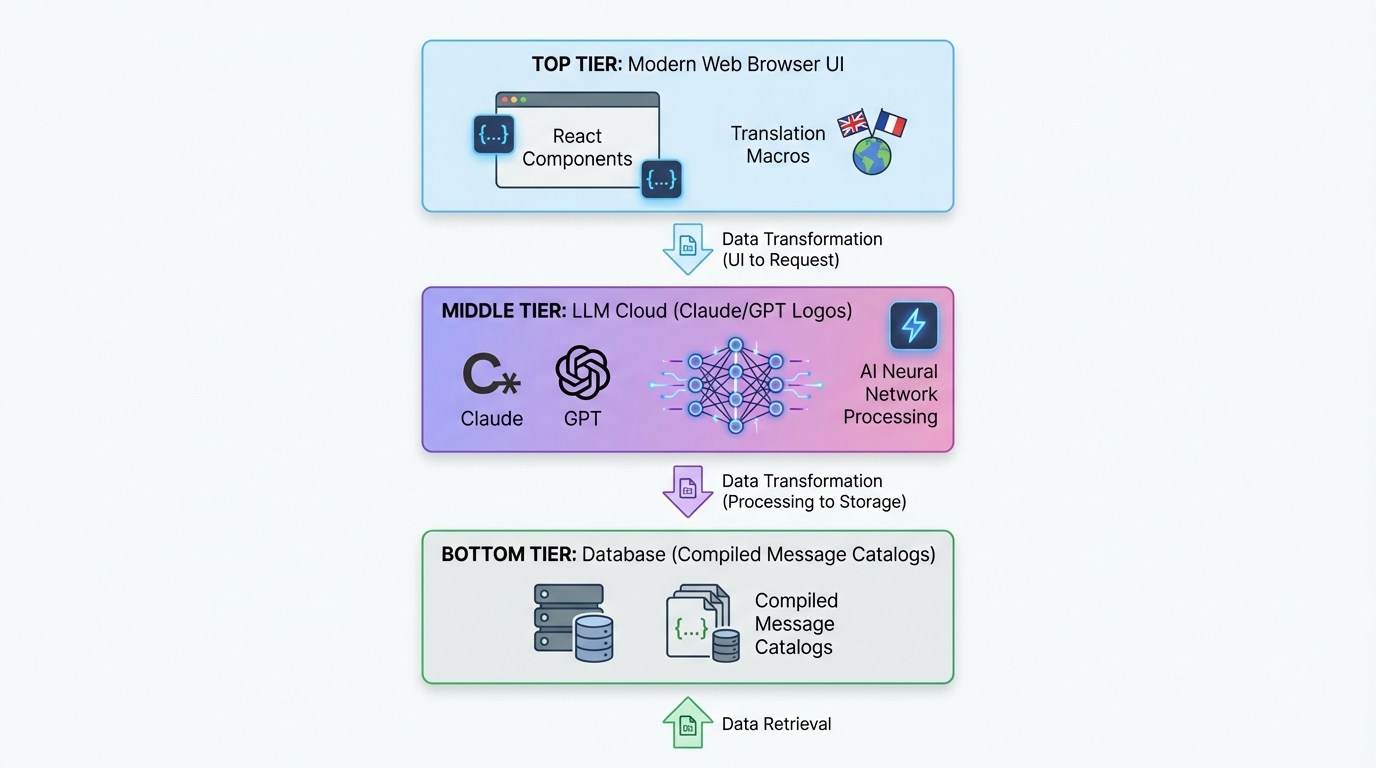
สถาปัตยกรรมแบบ 2 ส่วน (The Two-Piece Architecture)
นี่คือ Setup ของเรา:
┌─────────────────────────────────────────────┐
│  Next.js App (Lingui Integration)          │
│  ├─ Extract strings with macros             │
│  ├─ Trans/t components in your code         │
│  └─ Runtime i18n with compiled catalogs     │
└─────────────────────────────────────────────┘
              ↓ generates .po files
┌─────────────────────────────────────────────┐
│  @acme/i18n Package (LLM Translation)     │
│  ├─ Reads .po files                         │
│  ├─ Batch translates with Claude/GPT-5      │
│  ├─ Context-aware, product-specific         │
│  └─ Writes translated .po files             │
└─────────────────────────────────────────────┘
              ↓ compiles to TypeScript
┌─────────────────────────────────────────────┐
│  Compiled Message Catalogs                  │
│  └─ Fast, type-safe runtime translations    │
└─────────────────────────────────────────────┘
ส่วนที่ 1 (Lingui) จัดการเรื่อง Developer Experience ส่วนที่ 2 (Custom i18n Package) จัดการเรื่องเวทมนตร์การแปลภาษา
มาเจาะลึกกันทีละส่วนครับ
ส่วนที่ 1: ติดตั้ง Lingui ใน Next.js
การติดตั้ง (Installation)
ใน T3 Turbo monorepo ของคุณ:
# ใน apps/nextjs
pnpm add @lingui/core @lingui/react @lingui/macro
pnpm add -D @lingui/cli @lingui/swc-plugin
Lingui Config
สร้างไฟล์ apps/nextjs/lingui.config.ts:
import type { LinguiConfig } from "@lingui/conf";

const config: LinguiConfig = {
  locales: [
    "en", "zh_CN", "zh_TW", "ja", "ko",
    "de", "fr", "es", "pt", "ar", "it",
    "ru", "tr", "th", "id", "vi", "hi"
  ],
  sourceLocale: "en",
  fallbackLocales: {
    default: "en"
  },
  catalogs: [
    {
      path: "<rootDir>/src/locales/{locale}/messages",
      include: ["src"],
    },
  ],
};

export default config;
17 ภาษาตั้งแต่เริ่มต้น เพราะทำไมจะไม่ล่ะ?
Next.js Integration
อัปเดต next.config.js เพื่อใช้ SWC plugin ของ Lingui:
const linguiConfig = require("./lingui.config");

module.exports = {
  experimental: {
    swcPlugins: [
      [
        "@lingui/swc-plugin",
        {
          // สิ่งนี้จะทำให้ build ของคุณเร็วขึ้น
        },
      ],
    ],
  },
  // ... config ส่วนอื่นๆ ของคุณ
};
Server-Side Setup
สร้าง src/utils/i18n/appRouterI18n.ts:
import { setupI18n } from "@lingui/core";
import { allMessages } from "./initLingui";

const locales = ["en", "zh_CN", "zh_TW", /* ... */] as const;

const instances = new Map<string, ReturnType<typeof setupI18n>>();

// Pre-create i18n instances สำหรับทุก locale
locales.forEach((locale) => {
  const i18n = setupI18n({
    locale,
    messages: { [locale]: allMessages[locale] },
  });
  instances.set(locale, i18n);
});

export function getI18nInstance(locale: string) {
  return instances.get(locale) ?? instances.get("en")!;
}
ทำไมต้องทำแบบนี้? เพราะ Server Components ไม่มี React Context วิธีนี้จะทำให้คุณแปลภาษาฝั่ง Server ได้ครับ
Client-Side Provider
สร้าง src/providers/LinguiClientProvider.tsx:
"use client";

import { I18nProvider } from "@lingui/react";
import { setupI18n } from "@lingui/core";
import { useEffect, useState } from "react";

export function LinguiClientProvider({
  children,
  locale,
  messages
}: {
  children: React.ReactNode;
  locale: string;
  messages: any;
}) {
  const [i18n] = useState(() =>
    setupI18n({
      locale,
      messages: { [locale]: messages },
    })
  );

  useEffect(() => {
    i18n.load(locale, messages);
    i18n.activate(locale);
  }, [locale, messages, i18n]);

  return <I18nProvider i18n={i18n}>{children}</I18nProvider>;
}
ครอบ App ของคุณใน layout.tsx:
import { LinguiClientProvider } from "@/providers/LinguiClientProvider";
import { getLocale } from "@/utils/i18n/localeDetection";
import { allMessages } from "@/utils/i18n/initLingui";

export default function RootLayout({ children }: { children: React.ReactNode }) {
  const locale = getLocale();

  return (
    <html lang={locale}>
      <body>
        <LinguiClientProvider locale={locale} messages={allMessages[locale]}>
          {children}
        </LinguiClientProvider>
      </body>
    </html>
  );
}
การใช้คำแปลใน Code ของคุณ
ใน Server Components:
import { msg } from "@lingui/core/macro";
import { getI18nInstance } from "@/utils/i18n/appRouterI18n";

export async function generateMetadata({ params }) {
  const locale = getLocale();
  const i18n = getI18nInstance(locale);

  return {
    title: i18n._(msg`Pricing Plans | acme`),
    description: i18n._(msg`Choose the perfect plan for you`),
  };
}
ใน Client Components:
"use client";

import { Trans, useLingui } from "@lingui/react/macro";

export function PricingCard() {
  const { t } = useLingui();

  return (
    <div>
      <h1><Trans>Pricing Plans</Trans></h1>
      <p>{t`Ultimate entertainment experience`}</p>

      {/* แบบมีตัวแปร */}
      <p>{t`${credits} credits remaining`}</p>
    </div>
  );
}
Macro syntax คือกุญแจสำคัญ Lingui จะดึงข้อความเหล่านี้ออกมาตอน Build time ครับ
ส่วนที่ 2: Package แปลภาษาพลัง AI
ตรงนี้แหละที่เริ่มเด็ด
โครงสร้าง Package
สร้าง packages/i18n/:
packages/i18n/
├── package.json
├── src/
│   ├── translateWithLLM.ts      # Core LLM translation
│   ├── enhanceTranslations.ts   # Batch processor
│   └── utils.ts                  # Helpers
package.json
{
  "name": "@acme/i18n",
  "version": "0.1.0",
  "dependencies": {
    "@acme/ai": "workspace:*",
    "openai": "^4.77.3",
    "pofile": "^1.1.4",
    "zod": "^3.23.8"
  }
}
The LLM Translation Engine
นี่คือสูตรลับของเรา - translateWithLLM.ts:
import { openai } from "@ai-sdk/openai";
import { generateText } from "ai";
import { z } from "zod";

const translationSchema = z.object({
  translations: z.array(
    z.object({
      msgid: z.string(),
      msgstr: z.string(),
    })
  ),
});

export async function translateWithLLM(
  messages: Array<{ msgid: string; msgstr: string }>,
  targetLocale: string,
  options?: { model?: string }
) {
  const prompt = `You are a professional translator for acme, an AI-powered creative platform.

Translate the following strings from English to ${getLanguageName(targetLocale)}.

CONTEXT:
- acme is a platform for AI chat, image generation, and creative content
- Keep brand names unchanged (acme, Claude, etc.)
- Preserve HTML tags, variables like {count}, and placeholders
- Adapt culturally where appropriate
- Maintain tone: friendly, creative, engaging

STRINGS TO TRANSLATE:
${JSON.stringify(messages, null, 2)}

Return a JSON object with this structure:
{
  "translations": [
    { "msgid": "original", "msgstr": "translation" },
    ...
  ]
}`;

  const result = await generateText({
    model: openai(options?.model ?? "gpt-4o"),
    prompt,
    temperature: 0.3, // ต่ำ = ผลลัพธ์คงที่
  });

  const parsed = translationSchema.parse(JSON.parse(result.text));
  return parsed.translations;
}

function getLanguageName(locale: string): string {
  const names: Record<string, string> = {
    zh_CN: "Simplified Chinese",
    zh_TW: "Traditional Chinese",
    ja: "Japanese",
    ko: "Korean",
    de: "German",
    fr: "French",
    es: "Spanish",
    pt: "Portuguese",
    ar: "Arabic",
    // ... etc
  };
  return names[locale] ?? locale;
}
ทำไมวิธีนี้ถึงเวิร์ก:
- Context-aware: LLM รู้ว่า acme คืออะไร
- Structured output: Zod schema รับประกันว่าเป็น JSON ที่ถูกต้อง
- Low temperature: ได้คำแปลที่สม่ำเสมอ
- Preserves formatting: HTML และตัวแปรต่างๆ ยังอยู่ครบ
Batch Translation Processor
สร้าง enhanceTranslations.ts:
import fs from "fs";
import path from "path";
import pofile from "pofile";
import { translateWithLLM } from "./translateWithLLM";

const BATCH_SIZE = 30; // แปลทีละ 30 strings
const DELAY_MS = 1000; // Rate limiting

export async function enhanceTranslations(
  locale: string,
  catalogPath: string
) {
  const poPath = path.join(catalogPath, locale, "messages.po");
  const po = pofile.parse(fs.readFileSync(poPath, "utf-8"));

  // หาตัวที่ยังไม่ได้แปล
  const untranslated = po.items.filter(
    (item) => item.msgid && (!item.msgstr || item.msgstr[0] === "")
  );

  if (untranslated.length === 0) {
    console.log(`✓ ${locale}: All strings translated`);
    return;
  }

  console.log(`Translating ${untranslated.length} strings for ${locale}...`);

  // Process เป็นชุดๆ (Batches)
  for (let i = 0; i < untranslated.length; i += BATCH_SIZE) {
    const batch = untranslated.slice(i, i + BATCH_SIZE);
    const messages = batch.map((item) => ({
      msgid: item.msgid,
      msgstr: item.msgstr?.[0] ?? "",
    }));

    try {
      const translations = await translateWithLLM(messages, locale);

      // อัปเดตไฟล์ PO
      translations.forEach((translation, index) => {
        const item = batch[index];
        if (item) {
          item.msgstr = [translation.msgstr];
        }
      });

      console.log(`  ${i + batch.length}/${untranslated.length} translated`);

      // บันทึกความคืบหน้า
      fs.writeFileSync(poPath, po.toString());

      // Rate limiting
      if (i + BATCH_SIZE < untranslated.length) {
        await new Promise((resolve) => setTimeout(resolve, DELAY_MS));
      }
    } catch (error) {
      console.error(`  Error translating batch: ${error}`);
      // ทำต่อใน batch ถัดไป
    }
  }

  console.log(`✓ ${locale}: Translation complete!`);
}
Batch processing ช่วยป้องกันปัญหา Token limit และประหยัดค่าใช้จ่ายครับ
The Translation Script
สร้าง apps/nextjs/script/i18n.ts:
import { enhanceTranslations } from "@acme/i18n";
import { exec } from "child_process";
import { promisify } from "util";

const execAsync = promisify(exec);

const LOCALES = [
  "zh_CN", "zh_TW", "ja", "ko", "de",
  "fr", "es", "pt", "ar", "it", "ru"
];

async function main() {
  // Step 1: ดึง strings จาก code
  console.log("📝 Extracting strings...");
  await execAsync("pnpm run lingui:extract --clean");

  // Step 2: แปล strings ที่ขาดหายไปด้วย AI
  console.log("\n🤖 Translating with AI...");
  const catalogPath = "./src/locales";

  for (const locale of LOCALES) {
    await enhanceTranslations(locale, catalogPath);
  }

  // Step 3: Compile เป็น TypeScript
  console.log("\n⚡ Compiling catalogs...");
  await execAsync("npx lingui compile --typescript");

  console.log("\n✅ Done! All translations updated.");
}

main().catch(console.error);
เพิ่มใน package.json:
{
  "scripts": {
    "i18n": "tsx script/i18n.ts",
    "lingui:extract": "lingui extract",
    "lingui:compile": "lingui compile --typescript"
  }
}
รัน i18n Pipeline ของคุณ
# คำสั่งเดียวจัดการทุกอย่าง
$ pnpm run i18n

📝 Extracting strings...
Catalog statistics for src/locales/{locale}/messages:
┌──────────┬─────────────┬─────────┐
│ Language │ Total count │ Missing │
├──────────┼─────────────┼─────────┤
│ en       │         847 │       0 │
│ zh_CN    │         847 │     123 │
│ ja       │         847 │      89 │
└──────────┴─────────────┴─────────┘

🤖 Translating with AI...
Translating 123 strings for zh_CN...
  30/123 translated
  60/123 translated
  90/123 translated
  123/123 translated
✓ zh_CN: Translation complete!

⚡ Compiling catalogs...
✅ Done! All translations updated.
แค่นั้นแหละครับ เพิ่ม string ใหม่ในโค้ด รัน pnpm i18n ตู้ม—แปลเสร็จสรรพ 17 ภาษา

การสลับภาษา (Locale Switching)
อย่าลืมเรื่อง UX ด้วย นี่คือตัวเลือกภาษา:
"use client";

import { useLocaleSwitcher } from "@/hooks/useLocaleSwitcher";
import { useLocale } from "@/hooks/useLocale";

const LOCALES = {
  en: "English",
  zh_CN: "简体中文",
  zh_TW: "繁體中文",
  ja: "日本語",
  ko: "한국어",
  // ... etc
};

export function LocaleSelector() {
  const currentLocale = useLocale();
  const { switchLocale } = useLocaleSwitcher();

  return (
    <select
      value={currentLocale}
      onChange={(e) => switchLocale(e.target.value)}
    >
      {Object.entries(LOCALES).map(([code, name]) => (
        <option key={code} value={code}>
          {name}
        </option>
      ))}
    </select>
  );
}
Implementation ของ Hook:
// hooks/useLocaleSwitcher.tsx
"use client";

import { setUserLocale } from "@/utils/i18n/localeDetection";

export function useLocaleSwitcher() {
  const switchLocale = (locale: string) => {
    setUserLocale(locale);
    window.location.reload(); // บังคับ reload เพื่อเปลี่ยนภาษา
  };

  return { switchLocale };
}
เก็บค่าที่เลือกไว้ใน Cookie:
// utils/i18n/localeDetection.ts
import { cookies } from "next/headers";

export function setUserLocale(locale: string) {
  cookies().set("NEXT_LOCALE", locale, {
    maxAge: 365 * 24 * 60 * 60, // 1 ปี
  });
}

export function getLocale(): string {
  const cookieStore = cookies();
  return cookieStore.get("NEXT_LOCALE")?.value ?? "en";
}
ขั้นสูง: Type-Safe Translations
อยากได้ Type safety ไหม? Lingui จัดให้:
// แทนที่จะทำแบบนี้:
t`Hello ${name}`

// ใช้ msg descriptor:
import { msg } from "@lingui/core/macro";

const greeting = msg`Hello ${name}`;
const translated = i18n._(greeting);
IDE ของคุณจะ Autocomplete translation keys ให้เลย สวยงามมาก
ข้อควรพิจารณาเรื่อง Performance
1. Compile at Build Time
Lingui จะ compile คำแปลเป็น minified JSON ไม่มี overhead ในการ parse ตอน runtime
// Compiled output (minified):
export const messages = JSON.parse('{"ICt8/V":["视频"],"..."}');
2. Pre-load Server Catalogs
โหลด catalogs ทั้งหมดครั้งเดียวตอน startup (ดู appRouterI18n.ts ข้างบน) ไม่ต้องทำ File I/O ทุก request
3. Client Bundle Size
ส่งเฉพาะ locale ที่ใช้งานไปที่ client:
<LinguiClientProvider
  locale={locale}
  messages={allMessages[locale]} // แค่ locale เดียว
>
4. LLM Cost Optimization
- Batch translations: 30 strings ต่อ 1 API call
- Cache translations: ไม่ต้องแปลซ้ำถ้า string ไม่เปลี่ยน
- Use cheaper models: ใช้ GPT-4o-mini สำหรับภาษาที่ไม่สำคัญมาก
ค่าใช้จ่ายของเรา? ~$2-3 สำหรับ 800+ strings × 16 ภาษา เศษเงินเมื่อเทียบกับการจ้างคนแปล
การ Integration กับ Tech Stack ทั้งหมด
มาดูกันว่ามันทำงานร่วมกับส่วนอื่นๆ ของ T3 Turbo ยังไง:
tRPC กับ i18n
// server/api/routers/user.ts
import { createTRPCRouter, publicProcedure } from "../trpc";
import { msg } from "@lingui/core/macro";

export const userRouter = createTRPCRouter({
  subscribe: publicProcedure
    .mutation(async ({ ctx }) => {
      // Error ก็แปลได้นะ!
      if (!ctx.session?.user) {
        throw new TRPCError({
          code: "UNAUTHORIZED",
          message: ctx.i18n._(msg`You must be logged in`),
        });
      }

      // ... subscription logic
    }),
});
ส่ง i18n instance ผ่าน context:
// server/api/trpc.ts
import { getI18nInstance } from "@/utils/i18n/appRouterI18n";

export const createTRPCContext = async (opts: CreateNextContextOptions) => {
  const locale = getLocale();
  const i18n = getI18nInstance(locale);

  return {
    session: await getServerAuthSession(),
    i18n,
    locale,
  };
};
Database กับ Drizzle
เก็บค่าภาษาที่ user เลือก:
// packages/db/schema/user.ts
import { pgTable, text, varchar } from "drizzle-orm/pg-core";

export const users = pgTable("user", {
  id: varchar("id", { length: 255 }).primaryKey(),
  locale: varchar("locale", { length: 10 }).default("en"),
  // ... fields อื่นๆ
});
AI SDK Integration
แปลคำตอบจาก AI แบบ on the fly:
import { openai } from "@ai-sdk/openai";
import { generateText } from "ai";
import { useLingui } from "@lingui/react/macro";

export function useAIChat() {
  const { i18n } = useLingui();

  const chat = async (prompt: string) => {
    const systemPrompt = i18n._(msg`You are a helpful AI assistant for acme.`);

    return generateText({
      model: openai("gpt-4"),
      messages: [
        { role: "system", content: systemPrompt },
        { role: "user", content: prompt },
      ],
    });
  };

  return { chat };
}
Best Practices ที่เราได้เรียนรู้
1. ใช้ Macros เสมอ
// ❌ Bad: Runtime translation (ไม่ถูก extract)
const text = t("Hello world");

// ✅ Good: Macro (ถูก extract ตอน build time)
const text = t`Hello world`;
2. Context คือทุกสิ่ง
ใส่ comment ให้นักแปล (หรือ AI) ด้วย:
// i18n: This appears in the pricing table header
<Trans>Monthly</Trans>

// i18n: Button to submit payment form
<button>{t`Subscribe Now`}</button>
Lingui จะดึงข้อความพวกนี้ไปเป็น translator notes
3. จัดการ Plurals ให้ถูกต้อง
import { Plural } from "@lingui/react/macro";

<Plural
  value={count}
  one="# credit remaining"
  other="# credits remaining"
/>
แต่ละภาษามีกฎเรื่องพหูพจน์ต่างกัน Lingui จัดการให้หมด
4. Date/Number Formatting
ใช้ Intl APIs:
const date = new Intl.DateTimeFormat(locale, {
  dateStyle: "long",
}).format(new Date());

const price = new Intl.NumberFormat(locale, {
  style: "currency",
  currency: "USD",
}).format(29.99);
5. รองรับ RTL (ขวาไปซ้าย)
สำหรับภาษาอาหรับ ต้องจัดการทิศทางด้วย:
export default function RootLayout({ children }) {
  const locale = getLocale();
  const direction = locale === "ar" ? "rtl" : "ltr";

  return (
    <html lang={locale} dir={direction}>
      <body>{children}</body>
    </html>
  );
}
เพิ่มใน Tailwind config:
module.exports = {
  plugins: [
    require('tailwindcss-rtl'),
  ],
};
ใช้ directional classes:
<div className="ms-4"> {/* margin-start, ใช้ได้ทั้ง LTR/RTL */}
Checklist ก่อน Deploy
ก่อนจะ Ship งาน:
- รัน
pnpm i18nเพื่อให้แน่ใจว่าคำแปลทั้งหมดเป็นปัจจุบัน - ทดสอบแต่ละ locale ใน production mode
- ตรวจสอบว่า locale cookie จำค่าได้จริง
- เช็ค layout แบบ RTL สำหรับภาษาอาหรับ
- ทดสอบ UX ของตัวสลับภาษา
- เพิ่ม hreflang tags สำหรับ SEO
- ตั้งค่า locale-based routing ถ้าจำเป็น
- Monitor ค่าใช้จ่ายในการแปลด้วย LLM
ผลลัพธ์
หลังจากใช้ระบบนี้:
- รองรับ 17 ภาษา ตั้งแต่เริ่มต้น
- ~850 strings ถูกแปลโดยอัตโนมัติ
- ค่าใช้จ่ายรวม $2-3 สำหรับการแปลทั้งหมด
- รอบการอัปเดต 2 นาที เมื่อมีการเพิ่ม strings ใหม่
- ไม่ต้องแปลเองเลยแม้แต่คำเดียว
- ได้คำแปลคุณภาพสูงที่เข้าใจบริบท
เทียบกับ:
- จ้างคนแปล: $0.10-0.30 ต่อคำ = $1,000+
- บริการแบบดั้งเดิม: ก็ยังแพงและช้าอยู่ดี
- แปลเอง: สเกลไม่ไหว
ทำไมเรื่องนี้ถึงสำคัญในปี 2026
ฟังนะ โลกเว็บมันเป็น Global ถ้าคุณทำแค่ภาษาอังกฤษในปี 2026 คุณกำลังทิ้งคนอีก 90% ของโลกไว้ข้างหลัง
แต่ i18n แบบเดิมๆ มัน เจ็บปวด วิธีนี้ทำให้มันเป็นเรื่อง จิ๊บจ๊อย:
- เขียนโค้ดด้วย Trans/t macros (ใช้เวลา 2 วินาที)
- รัน
pnpm i18n(อัตโนมัติ) - Ship สู่ชาวโลก (แล้วรับทรัพย์)
การรวมพลังของ Developer Experience ของ Lingui + การแปลด้วย LLM คือจุดเปลี่ยนเกม คุณจะได้:
- Type-safe translations
- Zero-overhead runtime
- Automatic extraction
- Context-aware AI translations
- จ่ายแค่เศษเงินต่อภาษา
- สเกลได้ไม่จำกัด
ไปให้สุดกว่าเดิม
อยากอัปเลเวลไหม? ลองดูพวกนี้:
Dynamic Content Translation
เก็บคำแปลใน Database:
// packages/db/schema/content.ts
export const blogPosts = pgTable("blog_post", {
  id: varchar("id", { length: 255 }).primaryKey(),
  titleEn: text("title_en"),
  titleZhCn: text("title_zh_cn"),
  titleJa: text("title_ja"),
  // ... etc
});
แปลอัตโนมัติตอน Save:
import { translateWithLLM } from "@acme/i18n";

export const blogRouter = createTRPCRouter({
  create: protectedProcedure
    .input(z.object({ title: z.string() }))
    .mutation(async ({ input }) => {
      // แปลเป็นทุกภาษา
      const translations = await Promise.all(
        LOCALES.map(async (locale) => {
          const result = await translateWithLLM(
            [{ msgid: input.title, msgstr: "" }],
            locale
          );
          return [locale, result[0].msgstr];
        })
      );

      await db.insert(blogPosts).values({
        id: generateId(),
        titleEn: input.title,
        ...Object.fromEntries(translations),
      });
    }),
});
User-Provided Translations
ให้ User ช่วยส่งคำแปลที่ดีกว่าเข้ามา:
export const i18nRouter = createTRPCRouter({
  suggestTranslation: publicProcedure
    .input(z.object({
      msgid: z.string(),
      locale: z.string(),
      suggestion: z.string(),
    }))
    .mutation(async ({ input }) => {
      await db.insert(translationSuggestions).values(input);

      // แจ้งเตือนคนดูแล
      await sendEmail({
        to: "i18n@acme.com",
        subject: `New translation suggestion for ${input.locale}`,
        body: `"${input.msgid}" → "${input.suggestion}"`,
      });
    }),
});
A/B Testing Translations
ทดสอบว่าคำแปลแบบไหน Convert ได้ดีกว่า:
const variant = await abTest.getVariant("pricing-cta", locale);

const ctaText = variant === "A"
  ? t`Start Your Free Trial`
  : t`Try acme Free`;
The Code
ทั้งหมดนี้คือโค้ดระดับ Production จาก App จริง Implementation เต็มๆ อยู่ใน Monorepo ของเรา:
t3-acme-app/
├── apps/nextjs/
│   ├── lingui.config.ts
│   ├── src/
│   │   ├── locales/           # Compiled catalogs
│   │   ├── utils/i18n/        # i18n utilities
│   │   └── providers/         # LinguiClientProvider
│   └── script/i18n.ts         # Translation script
└── packages/i18n/
    └── src/
        ├── translateWithLLM.ts
        ├── enhanceTranslations.ts
        └── utils.ts
บทส่งท้าย
การสร้าง AI App ที่รองรับหลายภาษาในปี 2026 ไม่ใช่เรื่องยากอีกต่อไป เครื่องมือพร้อมแล้ว:
- Lingui สำหรับ extraction และ runtime
- Claude/GPT สำหรับการแปลที่เข้าใจบริบท
- T3 Turbo สำหรับ DX ที่ดีที่สุดในวงการ
เลิกจ่ายเงินเป็นพันเหรียญค่าแปลภาษา เลิกจำกัด App ของคุณไว้แค่ภาษาอังกฤษ
สร้างให้ Global ชิปให้ไว ใช้ AI
นี่แหละวิถีของปี 2026
มีคำถาม? เจอปัญหา? ทักผมมาได้ที่ Twitter หรือลองดู Lingui docs และ AI SDK docs
ทีนี้ก็ไป Ship App หลายภาษานั่นซะ โลกรอคุณอยู่
แชร์สิ่งนี้
เขียนโดย Feng Liu
shenjian8628@gmail.com