
Cách Xây Dựng Web App Hiện Đại Tích Hợp AI & Đa Ngôn Ngữ (i18n) Năm 2026
Hướng dẫn toàn tập xây dựng ứng dụng web đa ngôn ngữ với Lingui và dịch thuật AI. Tự động hỗ trợ 17 ngôn ngữ sử dụng Next.js, Claude và T3 Turbo.

Title: Này, chúng ta cần nói về chuyện i18n trong năm 2026
Thẳng thắn mà nói, chúng ta cần nói chuyện về i18n (đa ngôn ngữ) trong năm 2026.
Hầu hết các hướng dẫn sẽ bảo bạn dịch chuỗi ký tự (string) một cách thủ công, thuê biên dịch viên, hoặc dùng mấy cái API Google Translate lởm khởm nào đó. Nhưng vấn đề là: bạn đang sống trong kỷ nguyên của Claude Sonnet 4.5. Tại sao bạn vẫn dịch thuật theo kiểu năm 2019 vậy?
Tôi sẽ chỉ cho bạn cách chúng tôi xây dựng một webapp production có thể nói trôi chảy 17 ngôn ngữ, sử dụng kiến trúc i18n hai phần thực sự hợp lý:
- Lingui để trích xuất (extraction), biên dịch (compilation) và xử lý runtime.
- Một package i18n tùy chỉnh được hỗ trợ bởi LLM để dịch tự động và hiểu ngữ cảnh.
Tech stack của chúng tôi? Create T3 Turbo với Next.js, tRPC, Drizzle, Postgres, Tailwind, và AI SDK. Nếu bạn không sử dụng bộ này vào năm 2026, chúng ta cần phải có một cuộc trò chuyện khác đấy.
Bắt tay vào xây dựng nào.
Vấn đề với i18n truyền thống
Quy trình i18n truyền thống thường trông như thế này:
# Extract strings (Trích xuất chuỗi)
$ lingui extract

# ??? Bằng cách nào đó để có bản dịch ???
# (thuê người dịch, dùng dịch vụ kém chất lượng, khóc thét)

# Compile (Biên dịch)
$ lingui compile
Cái bước ở giữa ấy? Nó là một cơn ác mộng. Bạn hoặc là:
- Trả $$$ cho người dịch (chậm, đắt đỏ)
- Dùng các API dịch thuật cơ bản (mù ngữ cảnh, nghe như robot)
- Dịch thủ công (không thể mở rộng - scale được)
Chúng ta sẽ làm tốt hơn thế.
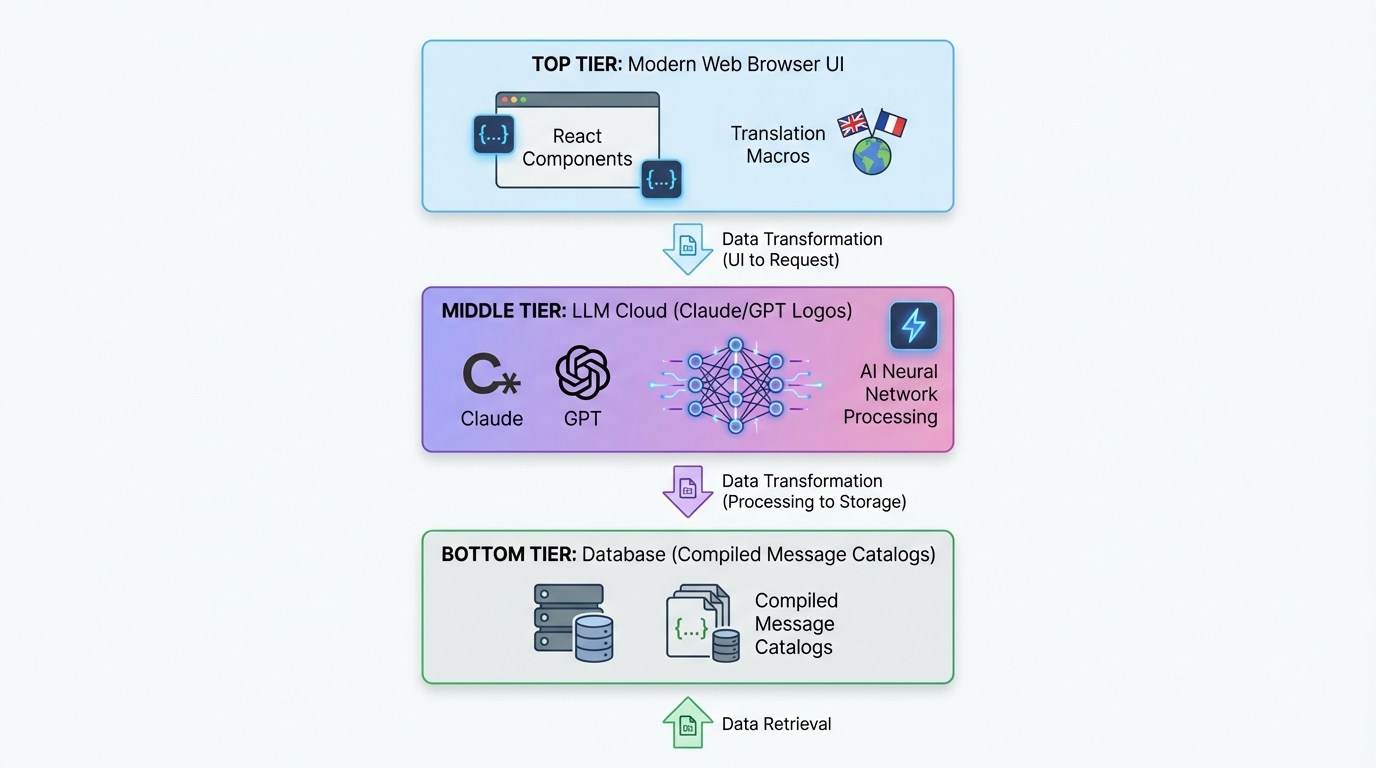
Kiến trúc Hai Phần
Đây là thiết lập của chúng tôi:
┌─────────────────────────────────────────────┐
│  Next.js App (Tích hợp Lingui)             │
│  ├─ Trích xuất chuỗi bằng macros            │
│  ├─ Các component Trans/t trong code        │
│  └─ Runtime i18n với catalogs đã biên dịch  │
└─────────────────────────────────────────────┘
              ↓ tạo ra các file .po
┌─────────────────────────────────────────────┐
│  @acme/i18n Package (Dịch bằng LLM)       │
│  ├─ Đọc các file .po                        │
│  ├─ Dịch hàng loạt với Claude/GPT-5         │
│  ├─ Hiểu ngữ cảnh, đặc thù sản phẩm         │
│  └─ Ghi lại các file .po đã dịch            │
└─────────────────────────────────────────────┘
              ↓ biên dịch sang TypeScript
┌─────────────────────────────────────────────┐
│  Compiled Message Catalogs                  │
│  └─ Dịch runtime nhanh, an toàn kiểu (type-safe) │
└─────────────────────────────────────────────┘
Phần 1 (Lingui) xử lý trải nghiệm của lập trình viên (DX). Phần 2 (Custom i18n Package) xử lý ma thuật dịch thuật.
Hãy đi sâu vào từng phần.
Phần 1: Thiết lập Lingui trong Next.js
Cài đặt
Trong monorepo T3 Turbo của bạn:
# Trong thư mục apps/nextjs
pnpm add @lingui/core @lingui/react @lingui/macro
pnpm add -D @lingui/cli @lingui/swc-plugin
Cấu hình Lingui
Tạo file apps/nextjs/lingui.config.ts:
import type { LinguiConfig } from "@lingui/conf";

const config: LinguiConfig = {
  locales: [
    "en", "zh_CN", "zh_TW", "ja", "ko",
    "de", "fr", "es", "pt", "ar", "it",
    "ru", "tr", "th", "id", "vi", "hi"
  ],
  sourceLocale: "en",
  fallbackLocales: {
    default: "en"
  },
  catalogs: [
    {
      path: "<rootDir>/src/locales/{locale}/messages",
      include: ["src"],
    },
  ],
};

export default config;
17 ngôn ngữ ngay từ đầu. Tại sao không chứ?
Tích hợp Next.js
Cập nhật next.config.js để sử dụng SWC plugin của Lingui:
const linguiConfig = require("./lingui.config");

module.exports = {
  experimental: {
    swcPlugins: [
      [
        "@lingui/swc-plugin",
        {
          // Cái này giúp build nhanh hơn
        },
      ],
    ],
  },
  // ... phần còn lại của config
};
Thiết lập Server-Side
Tạo src/utils/i18n/appRouterI18n.ts:
import { setupI18n } from "@lingui/core";
import { allMessages } from "./initLingui";

const locales = ["en", "zh_CN", "zh_TW", /* ... */] as const;

const instances = new Map<string, ReturnType<typeof setupI18n>>();

// Tạo trước các instance i18n cho tất cả locale
locales.forEach((locale) => {
  const i18n = setupI18n({
    locale,
    messages: { [locale]: allMessages[locale] },
  });
  instances.set(locale, i18n);
});

export function getI18nInstance(locale: string) {
  return instances.get(locale) ?? instances.get("en")!;
}
Tại sao? Server Components không có React Context. Cách này giúp bạn có bản dịch ở phía server.
Client-Side Provider
Tạo src/providers/LinguiClientProvider.tsx:
"use client";

import { I18nProvider } from "@lingui/react";
import { setupI18n } from "@lingui/core";
import { useEffect, useState } from "react";

export function LinguiClientProvider({
  children,
  locale,
  messages
}: {
  children: React.ReactNode;
  locale: string;
  messages: any;
}) {
  const [i18n] = useState(() =>
    setupI18n({
      locale,
      messages: { [locale]: messages },
    })
  );

  useEffect(() => {
    i18n.load(locale, messages);
    i18n.activate(locale);
  }, [locale, messages, i18n]);

  return <I18nProvider i18n={i18n}>{children}</I18nProvider>;
}
Bọc app của bạn trong layout.tsx:
import { LinguiClientProvider } from "@/providers/LinguiClientProvider";
import { getLocale } from "@/utils/i18n/localeDetection";
import { allMessages } from "@/utils/i18n/initLingui";

export default function RootLayout({ children }: { children: React.ReactNode }) {
  const locale = getLocale();

  return (
    <html lang={locale}>
      <body>
        <LinguiClientProvider locale={locale} messages={allMessages[locale]}>
          {children}
        </LinguiClientProvider>
      </body>
    </html>
  );
}
Sử dụng Dịch thuật trong Code
Trong Server Components:
import { msg } from "@lingui/core/macro";
import { getI18nInstance } from "@/utils/i18n/appRouterI18n";

export async function generateMetadata({ params }) {
  const locale = getLocale();
  const i18n = getI18nInstance(locale);

  return {
    title: i18n._(msg`Pricing Plans | acme`),
    description: i18n._(msg`Choose the perfect plan for you`),
  };
}
Trong Client Components:
"use client";

import { Trans, useLingui } from "@lingui/react/macro";

export function PricingCard() {
  const { t } = useLingui();

  return (
    <div>
      <h1><Trans>Pricing Plans</Trans></h1>
      <p>{t`Ultimate entertainment experience`}</p>

      {/* Với các biến */}
      <p>{t`${credits} credits remaining`}</p>
    </div>
  );
}
Cú pháp macro là CHÌA KHÓA. Lingui trích xuất những thứ này tại thời điểm build (build time).
Phần 2: Package Dịch thuật bằng AI
Đây là lúc mọi thứ trở nên thú vị.
Cấu trúc Package
Tạo packages/i18n/:
packages/i18n/
├── package.json
├── src/
│   ├── translateWithLLM.ts      # Core LLM translation
│   ├── enhanceTranslations.ts   # Batch processor
│   └── utils.ts                  # Helpers
package.json
{
  "name": "@acme/i18n",
  "version": "0.1.0",
  "dependencies": {
    "@acme/ai": "workspace:*",
    "openai": "^4.77.3",
    "pofile": "^1.1.4",
    "zod": "^3.23.8"
  }
}
Công cụ Dịch thuật LLM
Đây là bí thuật - translateWithLLM.ts:
import { openai } from "@ai-sdk/openai";
import { generateText } from "ai";
import { z } from "zod";

const translationSchema = z.object({
  translations: z.array(
    z.object({
      msgid: z.string(),
      msgstr: z.string(),
    })
  ),
});

export async function translateWithLLM(
  messages: Array<{ msgid: string; msgstr: string }>,
  targetLocale: string,
  options?: { model?: string }
) {
  const prompt = `You are a professional translator for acme, an AI-powered creative platform.

Translate the following strings from English to ${getLanguageName(targetLocale)}.

CONTEXT:
- acme is a platform for AI chat, image generation, and creative content
- Keep brand names unchanged (acme, Claude, etc.)
- Preserve HTML tags, variables like {count}, and placeholders
- Adapt culturally where appropriate
- Maintain tone: friendly, creative, engaging

STRINGS TO TRANSLATE:
${JSON.stringify(messages, null, 2)}

Return a JSON object with this structure:
{
  "translations": [
    { "msgid": "original", "msgstr": "translation" },
    ...
  ]
}`;

  const result = await generateText({
    model: openai(options?.model ?? "gpt-4o"),
    prompt,
    temperature: 0.3, // Thấp = nhất quán hơn
  });

  const parsed = translationSchema.parse(JSON.parse(result.text));
  return parsed.translations;
}

function getLanguageName(locale: string): string {
  const names: Record<string, string> = {
    zh_CN: "Simplified Chinese",
    zh_TW: "Traditional Chinese",
    ja: "Japanese",
    ko: "Korean",
    de: "German",
    fr: "French",
    es: "Spanish",
    pt: "Portuguese",
    ar: "Arabic",
    // ... vân vân
  };
  return names[locale] ?? locale;
}
Tại sao cách này hiệu quả:
- Hiểu ngữ cảnh: LLM biết "acme" là gì.
- Output có cấu trúc: Zod schema đảm bảo JSON hợp lệ.
- Temperature thấp: Bản dịch nhất quán.
- Giữ nguyên định dạng: HTML, biến số được giữ nguyên vẹn.
Bộ xử lý Dịch hàng loạt (Batch Processor)
Tạo enhanceTranslations.ts:
import fs from "fs";
import path from "path";
import pofile from "pofile";
import { translateWithLLM } from "./translateWithLLM";

const BATCH_SIZE = 30; // Dịch 30 chuỗi một lúc
const DELAY_MS = 1000; // Giới hạn tốc độ (Rate limiting)

export async function enhanceTranslations(
  locale: string,
  catalogPath: string
) {
  const poPath = path.join(catalogPath, locale, "messages.po");
  const po = pofile.parse(fs.readFileSync(poPath, "utf-8"));

  // Tìm các mục chưa được dịch
  const untranslated = po.items.filter(
    (item) => item.msgid && (!item.msgstr || item.msgstr[0] === "")
  );

  if (untranslated.length === 0) {
    console.log(`✓ ${locale}: All strings translated`);
    return;
  }

  console.log(`Translating ${untranslated.length} strings for ${locale}...`);

  // Xử lý theo lô (batch)
  for (let i = 0; i < untranslated.length; i += BATCH_SIZE) {
    const batch = untranslated.slice(i, i + BATCH_SIZE);
    const messages = batch.map((item) => ({
      msgid: item.msgid,
      msgstr: item.msgstr?.[0] ?? "",
    }));

    try {
      const translations = await translateWithLLM(messages, locale);

      // Cập nhật file PO
      translations.forEach((translation, index) => {
        const item = batch[index];
        if (item) {
          item.msgstr = [translation.msgstr];
        }
      });

      console.log(`  ${i + batch.length}/${untranslated.length} translated`);

      // Lưu tiến độ
      fs.writeFileSync(poPath, po.toString());

      // Rate limiting
      if (i + BATCH_SIZE < untranslated.length) {
        await new Promise((resolve) => setTimeout(resolve, DELAY_MS));
      }
    } catch (error) {
      console.error(`  Error translating batch: ${error}`);
      // Tiếp tục với lô tiếp theo
    }
  }

  console.log(`✓ ${locale}: Translation complete!`);
}
Xử lý theo lô giúp tránh giới hạn token và tiết kiệm chi phí.
Script Dịch thuật
Tạo apps/nextjs/script/i18n.ts:
import { enhanceTranslations } from "@acme/i18n";
import { exec } from "child_process";
import { promisify } from "util";

const execAsync = promisify(exec);

const LOCALES = [
  "zh_CN", "zh_TW", "ja", "ko", "de",
  "fr", "es", "pt", "ar", "it", "ru"
];

async function main() {
  // Bước 1: Trích xuất chuỗi từ code
  console.log("📝 Extracting strings...");
  await execAsync("pnpm run lingui:extract --clean");

  // Bước 2: Tự động dịch các chuỗi còn thiếu
  console.log("\n🤖 Translating with AI...");
  const catalogPath = "./src/locales";

  for (const locale of LOCALES) {
    await enhanceTranslations(locale, catalogPath);
  }

  // Bước 3: Biên dịch sang TypeScript
  console.log("\n⚡ Compiling catalogs...");
  await execAsync("npx lingui compile --typescript");

  console.log("\n✅ Done! All translations updated.");
}

main().catch(console.error);
Thêm vào package.json:
{
  "scripts": {
    "i18n": "tsx script/i18n.ts",
    "lingui:extract": "lingui extract",
    "lingui:compile": "lingui compile --typescript"
  }
}
Chạy Pipeline i18n
# Một lệnh để quản lý tất cả
$ pnpm run i18n

📝 Extracting strings...
Catalog statistics for src/locales/{locale}/messages:
┌──────────┬─────────────┬─────────┐
│ Language │ Total count │ Missing │
├──────────┼─────────────┼─────────┤
│ en       │         847 │       0 │
│ zh_CN    │         847 │     123 │
│ ja       │         847 │      89 │
└──────────┴─────────────┴─────────┘

🤖 Translating with AI...
Translating 123 strings for zh_CN...
  30/123 translated
  60/123 translated
  90/123 translated
  123/123 translated
✓ zh_CN: Translation complete!

⚡ Compiling catalogs...
✅ Done! All translations updated.
Thế là xong. Thêm một chuỗi mới vào code, chạy pnpm i18n, bùm - nó đã được dịch sang 17 ngôn ngữ.

Chuyển đổi Ngôn ngữ (Locale Switching)
Đừng quên phần trải nghiệm người dùng (UX). Đây là bộ chuyển đổi ngôn ngữ:
"use client";

import { useLocaleSwitcher } from "@/hooks/useLocaleSwitcher";
import { useLocale } from "@/hooks/useLocale";

const LOCALES = {
  en: "English",
  zh_CN: "简体中文",
  zh_TW: "繁體中文",
  ja: "日本語",
  ko: "한국어",
  // ... vân vân
};

export function LocaleSelector() {
  const currentLocale = useLocale();
  const { switchLocale } = useLocaleSwitcher();

  return (
    <select
      value={currentLocale}
      onChange={(e) => switchLocale(e.target.value)}
    >
      {Object.entries(LOCALES).map(([code, name]) => (
        <option key={code} value={code}>
          {name}
        </option>
      ))}
    </select>
  );
}
Triển khai hook:
// hooks/useLocaleSwitcher.tsx
"use client";

import { setUserLocale } from "@/utils/i18n/localeDetection";

export function useLocaleSwitcher() {
  const switchLocale = (locale: string) => {
    setUserLocale(locale);
    window.location.reload(); // Force reload để áp dụng locale
  };

  return { switchLocale };
}
Lưu tùy chọn vào cookie:
// utils/i18n/localeDetection.ts
import { cookies } from "next/headers";

export function setUserLocale(locale: string) {
  cookies().set("NEXT_LOCALE", locale, {
    maxAge: 365 * 24 * 60 * 60, // 1 năm
  });
}

export function getLocale(): string {
  const cookieStore = cookies();
  return cookieStore.get("NEXT_LOCALE")?.value ?? "en";
}
Nâng cao: Dịch thuật An toàn kiểu (Type-Safe)
Muốn type safety? Lingui lo hết:
// Thay vì thế này:
t`Hello ${name}`

// Sử dụng msg descriptor:
import { msg } from "@lingui/core/macro";

const greeting = msg`Hello ${name}`;
const translated = i18n._(greeting);
IDE của bạn sẽ tự động gợi ý các key dịch thuật. Tuyệt vời.
Cân nhắc về Hiệu năng
1. Biên dịch tại Build Time
Lingui biên dịch các bản dịch thành JSON đã được tối ưu (minified). Không tốn tài nguyên parse lúc runtime.
// Output đã biên dịch (minified):
export const messages = JSON.parse('{"ICt8/V":["视频"],"..."}');
2. Pre-load Server Catalogs
Load tất cả catalogs một lần khi khởi động (xem appRouterI18n.ts ở trên). Không tốn I/O file cho mỗi request.
3. Kích thước Client Bundle
Chỉ ship locale đang kích hoạt xuống client:
<LinguiClientProvider
  locale={locale}
  messages={allMessages[locale]} // Chỉ một locale
>
4. Tối ưu chi phí LLM
- Dịch theo lô: 30 chuỗi mỗi lần gọi API.
- Cache bản dịch: Không dịch lại các chuỗi không thay đổi.
- Dùng model rẻ hơn: GPT-4o-mini cho các ngôn ngữ không quá quan trọng.
Chi phí của chúng tôi? ~$2-3 cho 800+ chuỗi × 16 ngôn ngữ. Rẻ như cho so với thuê người dịch.
Tích hợp Full Tech Stack
Hãy xem cách nó hoạt động với phần còn lại của T3 Turbo:
tRPC với i18n
// server/api/routers/user.ts
import { createTRPCRouter, publicProcedure } from "../trpc";
import { msg } from "@lingui/core/macro";

export const userRouter = createTRPCRouter({
  subscribe: publicProcedure
    .mutation(async ({ ctx }) => {
      // Lỗi cũng có thể được dịch!
      if (!ctx.session?.user) {
        throw new TRPCError({
          code: "UNAUTHORIZED",
          message: ctx.i18n._(msg`You must be logged in`),
        });
      }

      // ... logic đăng ký
    }),
});
Truyền i18n instance qua context:
// server/api/trpc.ts
import { getI18nInstance } from "@/utils/i18n/appRouterI18n";

export const createTRPCContext = async (opts: CreateNextContextOptions) => {
  const locale = getLocale();
  const i18n = getI18nInstance(locale);

  return {
    session: await getServerAuthSession(),
    i18n,
    locale,
  };
};
Database với Drizzle
Lưu tùy chọn ngôn ngữ của user:
// packages/db/schema/user.ts
import { pgTable, text, varchar } from "drizzle-orm/pg-core";

export const users = pgTable("user", {
  id: varchar("id", { length: 255 }).primaryKey(),
  locale: varchar("locale", { length: 10 }).default("en"),
  // ... các trường khác
});
Tích hợp AI SDK
Dịch phản hồi của AI ngay tức thì (on the fly):
import { openai } from "@ai-sdk/openai";
import { generateText } from "ai";
import { useLingui } from "@lingui/react/macro";

export function useAIChat() {
  const { i18n } = useLingui();

  const chat = async (prompt: string) => {
    const systemPrompt = i18n._(msg`You are a helpful AI assistant for acme.`);

    return generateText({
      model: openai("gpt-4"),
      messages: [
        { role: "system", content: systemPrompt },
        { role: "user", content: prompt },
      ],
    });
  };

  return { chat };
}
Các bài học (Best Practices) chúng tôi rút ra
1. Luôn sử dụng Macros
// ❌ Tệ: Dịch Runtime (không được trích xuất)
const text = t("Hello world");

// ✅ Tốt: Macro (được trích xuất lúc build time)
const text = t`Hello world`;
2. Ngữ cảnh là tất cả
Thêm comment cho người dịch (hoặc AI):
// i18n: This appears in the pricing table header
<Trans>Monthly</Trans>

// i18n: Button to submit payment form
<button>{t`Subscribe Now`}</button>
Lingui trích xuất những dòng này thành ghi chú dịch thuật.
3. Xử lý số nhiều đúng cách
import { Plural } from "@lingui/react/macro";

<Plural
  value={count}
  one="# credit remaining"
  other="# credits remaining"
/>
Các ngôn ngữ khác nhau có quy tắc số nhiều khác nhau. Lingui xử lý việc đó.
4. Định dạng Ngày/Số
Sử dụng Intl APIs:
const date = new Intl.DateTimeFormat(locale, {
  dateStyle: "long",
}).format(new Date());

const price = new Intl.NumberFormat(locale, {
  style: "currency",
  currency: "USD",
}).format(29.99);
5. Hỗ trợ RTL (Phải sang Trái)
Đối với tiếng Ả Rập, xử lý hướng văn bản:
export default function RootLayout({ children }) {
  const locale = getLocale();
  const direction = locale === "ar" ? "rtl" : "ltr";

  return (
    <html lang={locale} dir={direction}>
      <body>{children}</body>
    </html>
  );
}
Thêm vào config Tailwind:
module.exports = {
  plugins: [
    require('tailwindcss-rtl'),
  ],
};
Sử dụng các class định hướng:
<div className="ms-4"> {/* margin-start, hoạt động cho cả LTR/RTL */}
Checklist Triển khai
Trước khi bạn ship:
- Chạy
pnpm i18nđể đảm bảo tất cả bản dịch được cập nhật - Test từng locale trong chế độ production
- Xác minh cookie locale vẫn tồn tại
- Kiểm tra layout RTL cho tiếng Ả Rập
- Test UX của bộ chuyển đổi ngôn ngữ
- Thêm thẻ hreflang cho SEO
- Thiết lập routing dựa trên locale nếu cần
- Theo dõi chi phí dịch thuật LLM
Kết quả
Sau khi triển khai hệ thống này:
- 17 ngôn ngữ được hỗ trợ ngay lập tức
- ~850 chuỗi được dịch tự động
- $2-3 tổng chi phí cho toàn bộ việc dịch
- Chu kỳ cập nhật 2 phút khi thêm chuỗi mới
- Không tốn chút công sức dịch tay nào
- Bản dịch chất lượng cao, hiểu ngữ cảnh
So sánh với:
- Thuê người dịch: $0.10-0.30 mỗi từ = $1,000+
- Dịch vụ truyền thống: Vẫn đắt, vẫn chậm
- Làm thủ công: Không thể scale nổi
Tại sao điều này quan trọng trong năm 2026
Nhìn này, web là toàn cầu. Nếu bạn chỉ ship tiếng Anh vào năm 2026, bạn đang bỏ lại 90% thế giới phía sau.
Nhưng i18n truyền thống thì đau khổ. Cách tiếp cận này làm cho nó trở nên tầm thường:
- Viết code với Trans/t macros (mất 2 giây)
- Chạy
pnpm i18n(tự động) - Ship ra thế giới (hưởng thành quả)
Sự kết hợp giữa trải nghiệm lập trình của Lingui + bản dịch hỗ trợ bởi LLM là một bước ngoặt. Bạn có được:
- Bản dịch type-safe
- Runtime không overhead
- Trích xuất tự động
- Bản dịch AI hiểu ngữ cảnh
- Chi phí vài xu cho mỗi ngôn ngữ
- Scale vô tận
Đi xa hơn
Muốn nâng cấp thêm? Thử xem:
Dịch Nội dung Động (Dynamic Content)
Lưu bản dịch trong database:
// packages/db/schema/content.ts
export const blogPosts = pgTable("blog_post", {
  id: varchar("id", { length: 255 }).primaryKey(),
  titleEn: text("title_en"),
  titleZhCn: text("title_zh_cn"),
  titleJa: text("title_ja"),
  // ... vân vân
});
Tự động dịch khi lưu:
import { translateWithLLM } from "@acme/i18n";

export const blogRouter = createTRPCRouter({
  create: protectedProcedure
    .input(z.object({ title: z.string() }))
    .mutation(async ({ input }) => {
      // Dịch sang tất cả ngôn ngữ
      const translations = await Promise.all(
        LOCALES.map(async (locale) => {
          const result = await translateWithLLM(
            [{ msgid: input.title, msgstr: "" }],
            locale
          );
          return [locale, result[0].msgstr];
        })
      );

      await db.insert(blogPosts).values({
        id: generateId(),
        titleEn: input.title,
        ...Object.fromEntries(translations),
      });
    }),
});
Bản dịch do Người dùng Đóng góp
Cho phép người dùng gửi bản dịch tốt hơn:
export const i18nRouter = createTRPCRouter({
  suggestTranslation: publicProcedure
    .input(z.object({
      msgid: z.string(),
      locale: z.string(),
      suggestion: z.string(),
    }))
    .mutation(async ({ input }) => {
      await db.insert(translationSuggestions).values(input);

      // Thông báo cho người bảo trì
      await sendEmail({
        to: "i18n@acme.com",
        subject: `New translation suggestion for ${input.locale}`,
        body: `"${input.msgid}" → "${input.suggestion}"`,
      });
    }),
});
A/B Testing Bản dịch
Test xem bản dịch nào chuyển đổi tốt hơn:
const variant = await abTest.getVariant("pricing-cta", locale);

const ctaText = variant === "A"
  ? t`Start Your Free Trial`
  : t`Try acme Free`;
Code
Tất cả những thứ này là code production từ một ứng dụng thực tế. Toàn bộ phần triển khai nằm trong monorepo của chúng tôi:
t3-acme-app/
├── apps/nextjs/
│   ├── lingui.config.ts
│   ├── src/
│   │   ├── locales/           # Catalogs đã biên dịch
│   │   ├── utils/i18n/        # Các tiện ích i18n
│   │   └── providers/         # LinguiClientProvider
│   └── script/i18n.ts         # Script dịch thuật
└── packages/i18n/
    └── src/
        ├── translateWithLLM.ts
        ├── enhanceTranslations.ts
        └── utils.ts
Lời kết
Xây dựng một ứng dụng AI đa ngôn ngữ vào năm 2026 không còn khó nữa. Các công cụ đã có sẵn:
- Lingui cho trích xuất và runtime
- Claude/GPT cho dịch thuật hiểu ngữ cảnh
- T3 Turbo cho trải nghiệm DX tốt nhất trong cuộc chơi
Đừng tốn cả ngàn đô cho dịch thuật nữa. Đừng giới hạn ứng dụng của bạn chỉ trong tiếng Anh.
Xây dựng toàn cầu. Ship nhanh. Dùng AI.
Đó là cách chúng tôi làm trong năm 2026.
Có câu hỏi? Vấn đề? Tìm tôi trên Twitter hoặc xem tài liệu Lingui và tài liệu AI SDK.
Giờ thì đi ship cái app đa ngôn ngữ đó đi. Thế giới đang chờ đấy.
Excerpt: Đừng dịch thủ công nữa. Đây là cách tôi xây dựng ứng dụng web nói được 17 ngôn ngữ bằng cách kết hợp Lingui và LLM trong stack T3 Turbo, tiết kiệm hàng ngàn đô la và tự động hóa hoàn toàn quy trình i18n.
Chia sẻ
Được viết bởi Feng Liu
shenjian8628@gmail.com